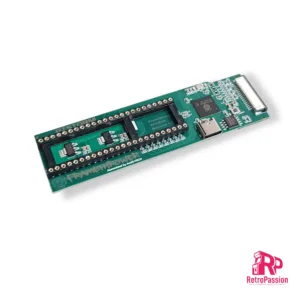
FrameThrower PiStorm for Amiga A500
FrameThrower PiStorm for the Amiga A500 is an adapter that allows the Amiga 500 to output Retargetable Graphics (RTG) desktop like displayed from AmiKit and native Amiga screen modes (essential for playing classic games from floppy disk or WHDLoad) to a single modern HDMI output.
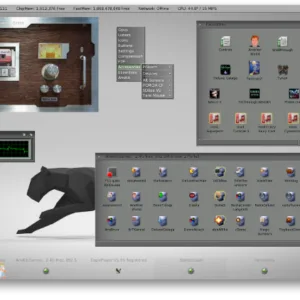
AmiKIT PiStorm and Pistorm32 (RPi 3A+, CM4 and RPi4 B)
AmiKit Pistorm and PiStorm32 is a pre-installed full workbench environment for the Commodore Amiga A500 A500 Plus, A600, A1200 and A2000 equipped with a Pistorm A500, Pistorm A600, PiStorm32-Lite or PiStorm32-Lite CM4.
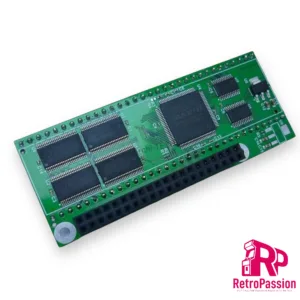
PiStorm Adaptor Amiga A500 – A500 Plus
PiStorm Adaptor is designed to connect to the Raspberry Pi 3A + (not included but available as an option below). Placed in the DIP64 (CPU) socket of your Amiga A500, A500 Plus or A2000 in conjunction with the Raspberry Pi, it can emulate the operation of the 68020/68030/68040 processor. The software running on PiOS greatly extends the functionality of the Amiga – adding FAST memory, RTG (graphics card) and a network card. PiStorm is designed for Amiga computers (A500 / A500 Plus / A1500 / A2000), but should work with any 16-bit computer equipped with a 68000 CPU socket (FC adapter lines are not currently used / supported by firmware and cannot be guaranteed to work properly on systems with use them). Overall performance with the current use of “Musashi” as a 68k processor emulator is around 70-80 MHz 68030.
This adapter requires:
- Raspberry Pi model 3A
- 32Gb SD Card configured to boot in to WB
All available as an option below
Want to know more about the PiStorm check out the following link: https://github.com/captain-amygdala/pistorm
NOTE: This is a community project and will require some knowledge Amiga. We DO NOT provide any support for getting this product running, but support is available via the following Discord channel https://discord.com/invite/j6rPtzxaNW Also this product is still in BETA and while compatibility is very high, updates are always being released to increase compatibility with software and games.
We do sell refurbished Amiga A500 and A500 Plus’s which can have a PiStorm installed tested and running. Also we can add a PiStorm installation as part of any Amiga A500 or A500 Plus Service.
We support developers and a percentage of the purchase price of the PiStorm adaptor is given to Claude Schwarz
The PiStorm adaptors are professionally manufacture and are RoHS compliant.
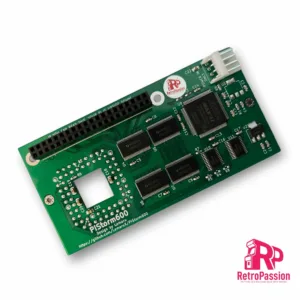
PiStorm600 Adaptor for Amiga A600
PiStorm600 for the Amiga A600 is an adaptor in which you plug in either a Raspberry Pi Model 3A+ or *Raspberry Pi Zero Model 2 (both not included) this provides a budget CPU accelerator for the Amiga 600. Also included is a file-based SCSI device, RTG graphics and several other optional enhancements.
Only the Pi 3-series is compatible with the current firmware version and only the Pi Model 3A+ and Raspberry Pi Zero Model 2 will physically fit in the A600 without modification and you can optionally support the PiStorm600 using M2.5 standoffs to help physically support it which are available as an option below.
Key Features
- Emulate 68010,68020,68030,68040,68060 Processors with or without FPU
- 128Mb Fastram.
- File-based SCSI device.
- RTG graphics from the Pi itself.
Notes:
Powering the A600/PiStorm
It is possible if you have a weak PSU or the Amiga 600 has not been recapped you may see instability issues as with any accelerator, you have a few options all of which are available below, If your using a Pi Zero2 then it is unlikely you will need to apply additional power. A Pi 3A+ can consume more power, but this is not often an issue until you start connecting USB devices, you have a few options below:
- You can add extra power via a floppy power connector splitter (available below) which is a new cable which splits the floppy power to power both your internal floppy drive and the PiStorm via its built in Molex connector (DO NOT ADD POWER OTHER THAN FROM THE AMIGA ITSELF OR TRY AND USE IT TO POWER OTHER DEVICES).
- Make sure your Amiga has been recapped, we offer 2 options Standard and Premium.
- Purchase a new Amiga PSU of which we also offer 2 versions, A600 Standard PSU or A600 Boost PSU which also as a 5VDC line adjustment to give a perfect 5 Volts to the Amiga 600.
We always suggest recapping in the first instance as tired caps can cause other issues like poor sound or prevent the Amiga booting up.
NOTE: PiStorm600 is a community project and will require some knowledge of the Amiga. Hardware which comes with a 1 year RTB warranty. hints and tips are available via the following Discord channel https://discord.com/invite/j6rPtzxaNW Also this product is still in BETA and while compatibility is very high, updates are always being released to increase compatibility with software and games.
We support developers by donating a percentage of sales, the PiStorm A600 adaptors are professionally manufactured and are RoHS compliant. This project was designed by Lemaru
*Using the Raspberry Pi Zero Model 2 is possible as mentioned but you do lose a little in performance.

FrameThrower 600 for Amiga A600 PiStorm600
FrameThrower 600 Amiga A600 adapter, this enables an output RTG desktop and native Amiga 15khz screen modes using single PiStorm accelerator HDMI output.