Back to A500 Upgrades
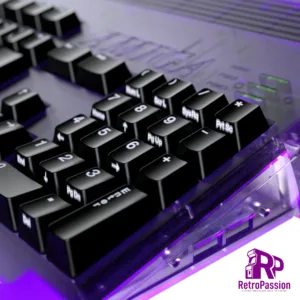
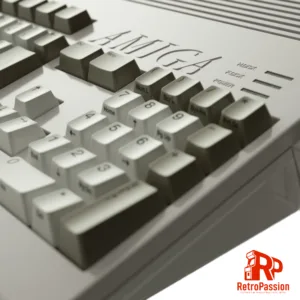
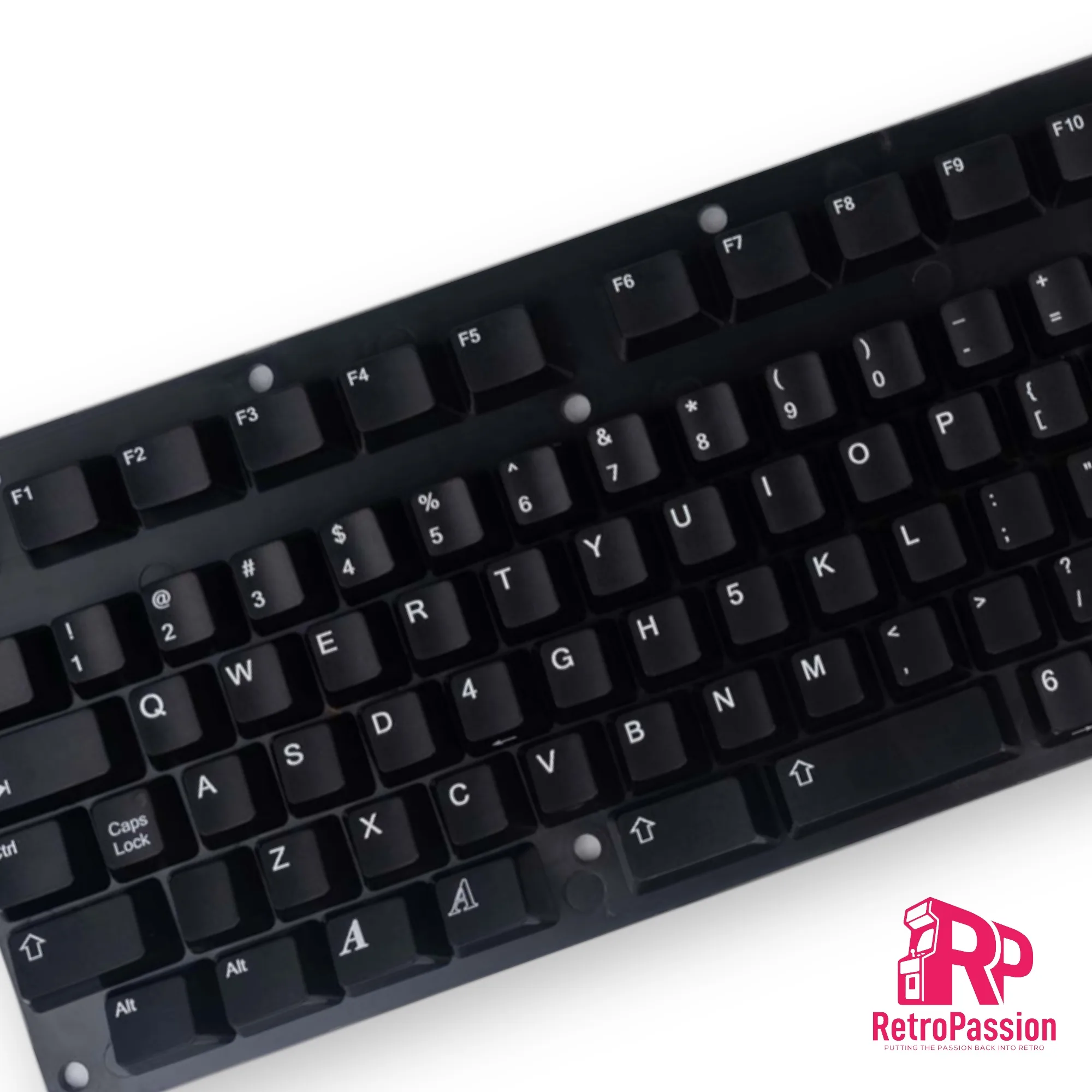
Amiga Black Keycaps A1200 A500 A600 Multiple Layouts
£83.33 Ex. VAT
Amiga Black Keycaps A1200 A500 A600 & CDTV Black Keycaps Layout Amiga Keycaps Set. Each sets contains 108 keycaps. The Keycaps can be used on ISO & ANSI keyboards, also included are extra keycaps to support the specific layout of the Mitsumi Amiga A600 Keyboard (green ribbon version NOT blue version).
Compatibility Notice
- New Amiga Keycaps are compatible with Mitsumi Switches only!
- Not compatible with Amiga 1000.
What’s in the box
- 96x Keycaps : Compatible with A1200 / A500 / A600 / A2000 / A3000 / A4000
- Includes : Standard Return Key (ISO) / FAT Return Key (ANSI) & Additional long Shift Key (ANSI)
- 12x Keycaps for Amiga A600 compatibility
- 1x Standard Space bar
- 1x Short Space bar (A600)
- 100x Springs : Should you need to replace some old ones.
- Small & Medium sized plastic clips for special key stabilizers.
A perfect compliment to our Amiga A1200 cases available in Black, White and Translucent Purple
Images are for illustrative purposes only.
SKU: Amiga-Black-Keycaps
Categories: A1200 Upgrades, A500 Upgrades, A600 Upgrades, Amiga 1200 Cases
Tags: Amiga keycaps, black keycaps
You may also like…
Amiga A1200 White Case
Amiga A1200 white case new, manufactured by A1200.net
What's included?
Keyrah V3 for the Amiga 1200/600, C64, VIC 20 and C16[/caption]
Keyrah V3 is an IO adaptor that allows you to use the original keyboards of the Commodore Amiga 600 and 1200, Commodore 64, VIC-20 and C-16 within their respective cases. The purpose of this you can then install a Raspberry PI which uses the original keyboard of that computer and providing 2 x D9 ports. The new Amiga 1200 case has mounts are located at middle top of bottom shell. This location make the keyboard adapter available for Raspberry Pi or MiST board. Original Amiga 1200 keyboard ribbon will fit nicely just at the right place on the keyboard adapter board. I/O connectors are accessible through rear panel I/O slots.
[/pane]
[/accordion]
So what are the differences between the original Commodore case and the New A1200 case?
- Top case including enhancements
- Bottom case including enhancements
- Enhanced bottom trapdoor with extra vents.
- Enhanced rear trapdoor + extra plastic holder DVI / VGA shaped hole.
- Rubber feet
- Set of screws
How are these brand new?
In 2016 840 Amiga users made it possible in supporting a Kickstarter to reproduce the Amiga 12000 case, the new A1200 cases are made using Injection Molding manufacturing technique to produce top and bottom shells as well as trapdoors and parts. The process implies the use of 3 new moulds, the first one is for the top shell, second mould for the bottom shell and last one for trapdoors and parts, all produced using brand new moulds.Enhancements galore:
The Amiga community has never died and some have produced some great add-ons over the years to make sure the Amiga is still relevant and useful today as it was back in the 80's/early 90s and these cases take full advantage of that weather that's simply transferring your existing motherboard from your existing Amiga 1200 or have a luxury of installing a MiST FPGA Board. Below are few more enhancements: [accordion] [pane title="External CF Adaptor" start=open] A CF slot can be opened up on the side of the A1200 case to allow easy access to what would be the CF card within the A1200 itself. [/pane] [pane title="MiST FPGA Board"] MiST is a FPGA based modern board that implements classic 16bit computers like the Commodore Amiga, Atari ST and 8bit systems like the Commodore 64, ZX-Spectrum, MSX, Atari XL/VCS, Apple II, Colecovision, Sega Master System, NES, SNES as well as Arcade machines. The primary difference between the MiST is that its NOT emulation. The new A1200 case has mounts to mount the MiST FPGA within the A1200 case. [/pane] [pane title="Raspberry PI"] Yes you can mount a Raspberry PI 2/3 within the new A1200 case with the use of the mounts already part of the case for a nice clean solution. [/pane] [pane title="Keyrah V2"] [caption id="attachment_18644" align="aligncenter" width="300"]
Keyrah V3 for the Amiga 1200/600, C64, VIC 20 and C16[/caption]
Keyrah V3 is an IO adaptor that allows you to use the original keyboards of the Commodore Amiga 600 and 1200, Commodore 64, VIC-20 and C-16 within their respective cases. The purpose of this you can then install a Raspberry PI which uses the original keyboard of that computer and providing 2 x D9 ports. The new Amiga 1200 case has mounts are located at middle top of bottom shell. This location make the keyboard adapter available for Raspberry Pi or MiST board. Original Amiga 1200 keyboard ribbon will fit nicely just at the right place on the keyboard adapter board. I/O connectors are accessible through rear panel I/O slots.
[/pane]
[/accordion]
So what are the differences between the original Commodore case and the New A1200 case?
- The plastic is more resistant to UV alteration. To avoid the case to turn yellow over time.
- All screws are secured with metal brass inserts. No more broken plastic clips.
- The bottom trapdoor has extra vents for a better case air flow.
- 2 new rear trapdoors are available to accommodate VGA and DVI. The third one is a Plain door.
- The case supports the following modern devices : Raspberry Pi©, MiST© FPGA, Keyrah© V3 keyboard adapter, RapidRoad© Double USB and Lotharek© HxC Floppy emulator, Flashfloppy
Amiga A1200 Black Case
Amiga A1200 black case NEW manufactrured by A1200.net
What's included?
Keyrah V3 for the Amiga 1200/600, C64, VIC 20 and C16[/caption]
Keyrah V3 is an IO adaptor that allows you to use the original keyboards of the Commodore Amiga 600 and 1200, Commodore 64, VIC-20 and C-16 within their respective cases. The purpose of this you can then install a Raspberry PI which uses the original keyboard of that computer and providing 2 x D9 ports. The new Amiga 1200 case has mounts are located at middle top of bottom shell. This location make the keyboard adapter available for Raspberry Pi or MiST board. Original Amiga 1200 keyboard ribbon will fit nicely just at the right place on the keyboard adapter board. I/O connectors are accessible through rear panel I/O slots.
[/pane]
[/accordion]
So what are the differences between the original Commodore case and the New A1200 case?
- Top case including enhancements
- Bottom case including enhancements
- Enhanced bottom trapdoor with extra vents.
- Enhanced rear trapdoor + extra plastic holder DVI / VGA shaped hole.
- Rubber feet
- Set of screws
How are these brand new?
In 2016 840 Amiga users made it possible in supporting a Kickstarter to reproduce the Amiga 1200 case, the new cases are made using Injection Molding manufacturing technique to produce top and bottom shells as well as trapdoors and parts. The process implies the use of 3 new moulds, the first one is for the top shell, second mould for the bottom shell and last one for trapdoors and parts, all produced using brand new moulds.Enhancements galore:
The Amiga community has never died and some have produced some great add-ons over the years to make sure the Amiga is still relevant and useful today as it was back in the 80's/early 90s and these cases take full advantage of that weather that's simply transferring your existing motherboard from your existing Amiga 1200 or have a luxury of installing a MiST FPGA Board. Below are few more enhancements: [accordion] [pane title="External CF Adaptor" start=open] A CF slot can be opened up on the side of the A1200 case to allow easy access to what would be the CF card within the A1200 itself. [/pane] [pane title="MiST FPGA Board"] MiST is a FPGA based modern board that implements classic 16bit computers like the Commodore Amiga, Atari ST and 8bit systems like the Commodore 64, ZX-Spectrum, MSX, Atari XL/VCS, Apple II, Colecovision, Sega Master System, NES, SNES as well as Arcade machines. The primary difference between the MiST is that its NOT emulation. The new A1200 case has mounts to mount the MiST FPGA within the A1200 case. [/pane] [pane title="Raspberry PI"] Yes you can mount a Raspberry PI 2/3 within the new A1200 case with the use of the mounts already part of the case for a nice clean solution. [/pane] [pane title="Keyrah V3"] [caption id="attachment_18644" align="aligncenter" width="300"]
Keyrah V3 for the Amiga 1200/600, C64, VIC 20 and C16[/caption]
Keyrah V3 is an IO adaptor that allows you to use the original keyboards of the Commodore Amiga 600 and 1200, Commodore 64, VIC-20 and C-16 within their respective cases. The purpose of this you can then install a Raspberry PI which uses the original keyboard of that computer and providing 2 x D9 ports. The new Amiga 1200 case has mounts are located at middle top of bottom shell. This location make the keyboard adapter available for Raspberry Pi or MiST board. Original Amiga 1200 keyboard ribbon will fit nicely just at the right place on the keyboard adapter board. I/O connectors are accessible through rear panel I/O slots.
[/pane]
[/accordion]
So what are the differences between the original Commodore case and the New A1200 case?
- All screws are secured with metal brass inserts. No more broken plastic clips.
- The bottom trapdoor has extra vents for a better case air flow.
- 2 new rear trapdoors are available to accommodate VGA and DVI. The third one is a Plain door.
- The case supports the following modern devices : Raspberry Pi©, MiST© FPGA, Keyrah© V3 keyboard adapter, RapidRoad© Double USB and Lotharek© HxC Floppy emulator, Flashfloppy
Related products
Amiga A600 Keyboard Membrane (New) BLUE
Amiga A600 Keyboard Membrane brand new BLUE. If you have issues with your Amiga A600 keyboard with missing keys or missing rows of keys the chances are the membrane needs replacing. There are 3 types of Mitsumi keyboard membrane for the Amiga A600:
- The A600 Blue Keyboard Membrane - (this one)
- The A600 Green Keyboard Membrane (model number 56C47A or 56C471A - maybe stamped A300-A)
- The A600 Green Keyboard Membrane (model number 56C47B or 56C471B - maybe stamped A300-B)
- Check the ribbon is inserted all the way in the connector on the Amiga A600 mainboard.
- If it's only 1 or two keys the plunger may need a clean, strip down the keyboard and clean the plunger with some IPA.
- If it's a whole row of keys missing its a very strong possibility that the membrane on your needs replacing.
- The final step is to trim off 1mm of the connector (the ribbon end that plugs into the A600 mainboard).
Amiga A600 8Mb Fast Ram PCMCIA switchable
Amiga A600 8Mb Fast Ram Card is PCMCIA switchable using a physical jumper to switch from 8Mb to 4Mb Perfect for WHDLoad, Its tiny size makes it the smallest 8Mb fast ram card for the Amiga 600.
- ON/OFF - You can enable or disable the card.
- 4Mb/8Mb jumper
- Transferring files from your PC/MAC using the a PCMCIA CF card adaptor
- Plug in a Ethernet card to transfer files from a PC/MAC via FTP
- Adding a CD Drive that has a PCMCIA interface
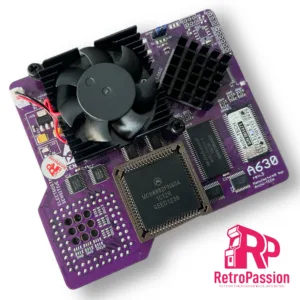
A630 Rev 3 Accelerator 68030 50Mhz, 64Mb, FPU Amiga A600 PURPLE
A630 Rev 3 68030 50Mhz inc FPU Amiga A600 PURPLE EDITION is the latest revision of the A630 modern turbo card with the classic 68030 Motorola processor running at 50Mhz and also includes an onboard FPU. Perfect for that sweet spot in speed and usefulness for Demos, WHDLoad* gaming, internet and so on. This will give any A600 a great speedboost in a compact unit.
Full specs:
- CPU MC68030, clocked on 50MHz.
- FPU 68882FN40 – synchronous or asynchronous clocking.
- 64MB SDRAM Fast Ram.
- Cooling: Active included.
- PCMCIA Friendly.
- PCB Colour – Purple
Important Information:
MMULib’s for the A630 Accelerator
The A630 Accelerator requires the installation of MMULib’s and it very important you use the right ones for the kickstart ROM you are using: 3.1 Kickstart: http://main.aminet.net/util/libs/MMULib.lha http://main.aminet.net/util/libs/MMULib.readme 3.2, 3.2.1 or 3.2.2 Install the MMULib package that came with the installation CD ONLY and NOT the ones from Aminet.Notes:
- Some demos or games may require disable “CPU CACHE” for better compatibility with the MC68000.
- The card is designed to work with 3.1 Roms and above including 3.2 and 3.2.1 of which can be purchased below.
- An internal HDD/CF/SD Card needs to be installed for the A630 to boot.
A1200 Case LED Board
A1200 Case LED board with power LED (green), floppy LED (yellow) and HDD LED (yellow). A simple replacement for your current Amiga 1200 LED board if its faulty or a great addition for the new A1200.net cases.