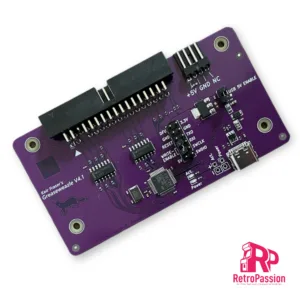
Greaseweazle v4.1 Amiga Amstrad, Spectrum
Greaseweazle V4.1 USB Floppy Adapter Flux Reader Writer

Greaseweazle v4.1 allows versatile floppy drive control over USB. By extracting the raw flux transitions from a drive, any disk format can be captured and analysed - PC, Amiga, Amstrad, PDP-11, musical instruments, industrial equipment, and more. The Greaseweazle also supports writing to floppy disks, from a range of image file formats including those commonly used for online preservation (ADF, IPF, DSK, IMG, HFE)
 

Greaseweazle V4.1 is the latest version, updated for mass production and with the following features:

  • Reads and writes 3", 3.5", 5.25", 8" disks (with suitable drive and cable)
  • Buffered outputs, for communicating with older 5.25" and 8" disk drives
  • Integrated power connector for directly powering most 3.5" disk drives
  • Write-enable jumper can be removed for safer preservation of precious vintage disks
  • Supports flippy-modded 5.25" drives
  • Supports Disk-Change detection as used by Rob Smith's integration into the WinUAE Amiga emulator
  • 3 user-definable outputs (eg. 8" interface REDWC signal)
  • 100% factory tested, and tested again by me before shipping

More information and documentation on the wiki page here:

This listing is for the Greaseweazle V4.1 device only. And does not include which you will require:

 
  • A disk drive (for example a PC 3.5" or 5.25" drive)
  • A floppy ribbon cable (typically you want a standard PC cable with 'twist' on pins 10-16, to communicate with a PC floppy drive)
  • Floppy drive power cable, or power supply
  Built by Zero Flux Development. And yes this is the item mentioned on Tom's Hardware: https://www.tomshardware.com/news/raspberry-pi-emulates-amiga-1200-uses-real-floppy-disks  
£27.49 Ex. VAT Add to basket
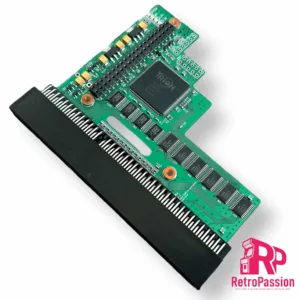
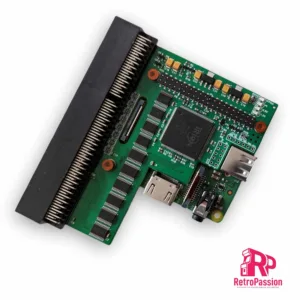
PiStorm32-Lite for Amiga A1200
PiStorm32 Lite A1200 with RPi 3A+, 64Gb SD Card
PiStorm32-Lite A1200 is the full package which includes:  
  • PiStorm32-Lite A1200 Adaptor
  • Raspberry Pi 3A+ Module
  • 64Gb SD Card (Pre-installed kernel with EMU68) You will need a copy of Workbench 3.0 or above and a kickstart rom again 3.1 or above or send us an SD image and we will install and setup FOC.
  • 3D printed RPi header protector
  Once installed and setup you will have an implementation of MC68020/030/040 with FPU support, coupled with a fast implementation of the Emu68 CPU unit (Emu68 is a JIT emulator) written by Michal Schulz, thanks to it the system boots in a few seconds. Extra functionality is added (thanks to an additional RPi 3A+ module) with an HDMI port, so you can have Full HD video and around 340MB of Fast Ram.   Check out this video by Capt. LeChuck, Pistorm32-Lite with EMU68K   [kad_youtube url="https://www.youtube.com/watch?v=8BBU48cLuUc&t=109s" ]   We also just sell the Pistorm32-Lite adaptor here, just add you own Raspberry Pi and SD Card.  
  NOTE: This is a open source project and will require some knowledge of the Amiga. The PiStorm adaptors are professionally manufactured, and a contribution to the developer is made.    
£124.99 Ex. VAT Read more
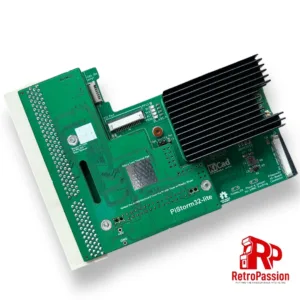
PiStorm32-Lite for Amiga A1200
PiStorm32 Lite for Amiga A1200 Adaptor Only
PiStorm32 Lite Adaptor for the Amiga A1200 is designed to connect one of the Raspberry Pi's listed below (not included) NOTE: We do sell a plug and play package here which includes PiStorm32-Lite, Raspberry Pi 3A & SD Card. Once you add your own Raspberry Pi, setup an SD card and plug it in the trapdoor of the A1200 like all A1200 accelerators (TF1230 or TF1260) you will have an accelerated Amiga 1200!   Compatible Rasperry Pi's:
  • Raspberry Pi 3A
  • Raspbery Pi 3B
  • Raspberry Pi 4B
  Want to know more about the PiStorm check out the following link: https://github.com/PiStorm/pistorm32-lite-hardware   Compatible Rasperry Pi's:
  • Raspberry Pi 3A
  • Raspbery Pi 3B
  • Raspberry Pi 4B
  With the Pistorm32-lite the A1200 can go up to a 68040 and using a Pi4 you could see 2000 Plus Mips! Want to know more about the PiStorm check out the following link: https://github.com/PiStorm/pistorm32-lite-hardware   The PiStorm adaptors are professionally manufactured. and a contribution to the developer is made to support this project.      
£70.83 Ex. VAT Read more
Amiga A1200 HDISK/FDISK LED Adaptor
Amiga A1200 HDISK/FDISK LED Adapter
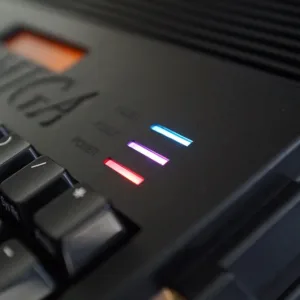
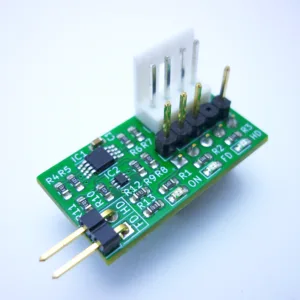
Amiga A1200 HDISK/FDISK LED adapter provides 2 separate inputs to show the activity of and not limited to, Icedrake V4, PiStorm32-Lite SD slot, hard drives or PCMCIA port using the original LED module on the Amiga 1200 LED panel. Signals for the internal HDD and DISK are transmitted as is, also this module corrects the constant LED light that may occur with some SD or CompactFlash cards. There are also LEDs on the module itself that show floppy and hard drive activity. This can be especially useful when the Amiga 1200 is operated without the original keyboard. Configuration  There are a total of 2 pins available on  J3  , which have the following characteristics.
  • A  = HDD input - (output via HDISK LED)
  • B  = FDD input - (output via FDISK LED)
  So for example you want to show the PCMCIA activity, you would connect a wire to the FDD input and any PCMCIA activity will show via the FDISK LED.   NOTE: Soldering skills will be required when connecting 3rd party activity signals to the Amiga A1200 HDISK/FDISK LED adapter, more details to follow.  
£10.83 Ex. VAT Read more
TF1230 Accelerator Amiga 1200 - Terriblefire
TF1232 Amiga Accelerator 128Mb
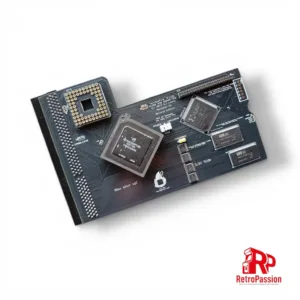
TF1232 Amiga Accelerator - Terriblefire for the Amiga 1200 which hosts a 68030 processor running at 50Mhz coupled with 128mb of fast ram. This card is a perfect add-on for the Amiga A1200 and is the sweet spot between cost and speed.This card is a perfect add-on for the Amiga A1200 and is the sweet spot between cost and speed. And is the next step up after the 11Mb Ex1T Fast Ram or if your budget does not quite stretch to the Terriblefire TF1260, the TF1230 A1200 card is the perfect add-on and you will notice a huge speed difference.
  • 68030 'Gold' CPU running at 50MHZ (NOT OVERCLOCKED) with MMU
  • 64Mb Fast Ram
  • IDE Interface - Driver required - ehide.device or purchase our AmigaOS 3.2 Rom with ehide.device built in (uploading of AmigaOS purchase evidence required)
  • Fits in your old/new stock A1200 case!!!
 
Prerequisites 
  • Timing fix is strongly recommended on your A1200 motherboard. We can do this free of charge if you send your board to us (return shipping does need to be covered).
  • Kickstart ROM 3.1, 3.1.4, 3.2, 3.x or 3.9 (not compatible with 3.0).
  • Some boards do not have a chamfered edge on the connector (1A and 1B boards) which may bend the connector pins, if your unsure please ask.
 
What is TerribleFire?
Well it's not what it's who, and that person is Stephen Leary who has designed a whole host of accelerators and ram cards for the Amiga A500, A1200 and Amiga CD32. These include many but the most common ones are:    
£158.33 Ex. VAT Select options
AmiKit PiStorm and PiStorm32-Lite CM4
AmiKIT for PiStorm and Pistorm32 (RPi 3A+, CM4 & RPi4 B)
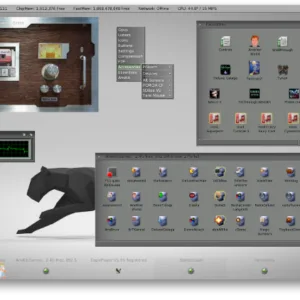
AmiKit for Pistorm and PiStorm32 is a pre-installed full workbench environment for the Commodore Amiga A500 A500 Plus, A600, A1200 and A2000 equipped with a Pistorm A500, Pistorm A600, PiStorm32-Lite or PiStorm32-Lite CM4. The SD card is packed with over 400+ classic Amiga programs and games. This version has been has been optimised for the PiStorm and It transforms your Amiga workbench interface in to a highly colourful, high resolution RTG desktop perfect for any HDMI monitor!! Checkout this video   What you need:
  • AmigaOS 3.2 ADF Files (Licenced AmigaOS 3.2 is available here)
  • AmigaOS 3.2.2 update (available free from Hyperion's website once you register AmigaOS 3.2)
  • AmigaOS 3.2.2.1 hotfix (again available free from Hyperon)
  • Picasso96 drivers from Aminet
  • Internet connection from your Amiga (to register AmiKit on AmiKit Servers) using a PCMCIA WiFi or LAN card, Plipbox etc. There is a 15min demo of Roadshow TCP/IP stack included. 
  • Full HD 1920x1080 monitor (or at least HD 1360x768) for RTG desktop plus a second Amiga monitor for 15kHz native modes like PAL/NTSC (or just one monitor with multiple inputs or a suitable video upscaler like the Indivision AGA MK3 for the A1200 allowing 15kHz modes on modern monitors)

  What's included
  • 32GB MicroSD Card preloaded with AmiKit for PiStorm.
  • Metal case for for 2 SD and 4 microSD cards.
  • MicroSD to SD card adapter.
  • Licence key to register with AmiKit
  [kad_youtube url="https://youtu.be/eMej-fn6af8?si=dL5RsNnDbTNnXu1o" ]   Full installation guide is here including how to register your copy of AmiKit.    
 

Recommended Specs:

Amiga 1200 with PiStorm32-lite & Raspberry Pi 4B (1GB+ RAM) or CM4 or at least RPi3; with heatsinks + ideally a cooling fan

Minimum Specs:

Amiga 500/600/2000 with PiStorm & Raspberry Pi 3A+ or 3B+ or Zero2W; with heatsinks + ideally a cooling fan

£41.66 Ex. VAT Select options
Amiga A1200 Keyboard Membrane (NEW)
Amiga A1200 Keyboard Membrane (New)
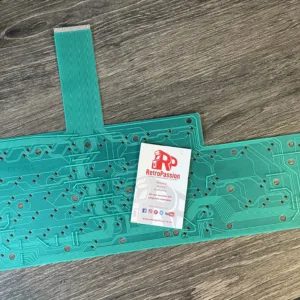
Amiga A1200 Keyboard Membrane brand new. If you have issues with your Amiga A1200 keyboard with missing keys or missing rows of keys the chances are the membrane needs replacing. These Amiga A1200 brand new (manufactured 2020) membranes are based on the original Mitsumi keyboard membrane (also marked A1200-A) and original Mitsumi Model number 56C774A. What if you have missing keys or rows of keys on the Keyboard? Try these possible fixes first:
  • Check the ribbon is inserted all the way in the connector on the Amiga A1200 mainboard.
  • If it's only 1 or two keys the plunger may need a clean, strip down the keyboard and clean the plunger with some IPA.
  • If it's a whole row of keys missing its a very strong possibility that the membrane on your needs replacing.
  • The final step is to trim off 1mm of the connector (the ribbon end that plugs into the A1200 mainboard).
Do let us know if any of the above fixes help you!  
£24.99 Ex. VAT Add to basket
PiStorm32-Lite CM4 Module Bundle
PiStorm32-Lite CM4, Expansion Breakout & 64Gb SD Card Bundle
PiStorm32-Lite CM4 bundle with Raspberry Pi CM4 module, expansion breakout with HDMI, Ethernet, USB and 64Gb SD Card. This is fully assembled, just installed Workbench. What's included:
  • Pistorm32-Lite adapter
  • CM4 Adapter (Allows connection of Expansion Breakout and Compute Module 4)
  • Raspberry Pi CM4 module with Wifi (Supports AmiKit also)
  • Passive Cooler
  • Expansion Breakout that provides HDMI, USB and Ethernet Ports
  • SD Card 64GB Sandisk Ultra (pre installed EMU68 on 200MB partition) Optional upgrade to AmiKit Pistorm edition*
  • Flex wire 40 Pin 20cm
  • Printed IO cover (3D printed)
   

Now with an added option of AmiKit and AmigaOS 3.2.2 plug and play options*. Now with WiFI**!

AmiKit PiStorm32 SD Card
  NOTE: The PiStorm32-Lite CM4 product is a open source project and will require some knowledge of the Amiga. *AmiKit Pistorm Edition requires AmigaOS 3.2 installation disks (ADF) and an internet connection, full details here. ** Wifi (wifipi.device) is still in alpha, which means that it can (and will) contain bugs. For this version you need to set up an unencrypted 2.4GHz wireless network (without a password). However, you can hide it in your router settings so that no one else can see it and connect to it. Future versions will bring WPA/WPA2 encryption.  
£183.33 Ex. VAT Read more
Indivision MK3 AGA for Amiga A1200 and A4000T
Indivision AGA MK3 Flickerfixer for A1200 and A4000T
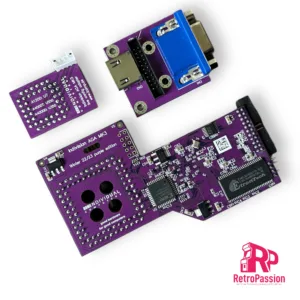
Indivision AGA MK3 for the A1200 and A4000T* (Not A4000D Desktop) providing both a VGA connection or HDMI so you have the flexibility of using a CRT/LCD PC monitor with VGA or a large TV with HDMI in. All Amiga screen modes are supported and can be sent to a digital or analogue monitor at almost any frame rate (with the exception of A2024 monitor modes). Either using standard VESA modes or using custom output frequencies and size at the user's choice. Even custom screen modes like HighGFX can be used. Workbench resolutions of 1280x1024 pixels are possible without buying a dedicated graphics card. Indivision AGA Mk3 is plugged over the Lisa chip and a second connection over the CIA chip to route keyboard signals to the flicker fixer. You can now make small adjustments to the output picture format including positioning and resizing of the output picture without the need to load the configuration tool. You can simply open the on screen menu using a hot-key combination make adjustments with the keyboard or mouse and then exit this live configuration menu, all this without leaving the game or demo that's currently running. Output screen modes can be saved "per input screen mode", so you can adjust your favourite Workbench resolution perfectly, while not affecting the settings you've chosen for PAL and NTSC games. Settings are saved in the flash of the flicker fixer, so they survive a reboot and/or power-cycle of the computer this allows you to "zap" through pre-sets that are ideal for a specific game or demo. With this you can adjust on the fly different settings for the built-in scanline effect, or you can compare the scaling capabilities of your monitor with the new built-in scaler of Indivision AGA MK3. The Indivision also has automatic monitor recognition, the configuration tool can detect what size of monitor is connected and make suggestions for ideal output frequencies that are within the specifications of the monitor. This reduces the "first setup" to a matter of minutes, maybe even seconds if you're using one of the pre-sets for popular display panel sizes that we provide.   What's included:
  1. Indivision AGA Mk3 for A1200/A4000T(*)
  2. Adapter board for high-definition digital (HDMI) and VGA output
  3. Adapter board for CIA chip
  4. Connection cables between all boards
  5. Short instructions
In addition, you will require:
  1. Screwdriver to open your computer
  2. A way to transfer the configuration tool (free download from our wiki)
  3. HighGFX software package from Aminet (free download for higher Workbench resolutions)
    (*)This flickerfixer will not fit into an A4000T out-of-the-box. Component CE164C gets in the way of the output cable connector and must be replaced with a lower-profile version prior to installing the flickerfixer. We recommend to do this before you order the product.   Note: ** We don't support or advise the use of the Meanwell PSU or its variants unless its an original Amiga PSU l that has been recapped (better), AT PSU or the CA-PSU. The primary reason is the PSU is the heart of the Amiga and reading the Individual Computers forum, the PSU is the 2nd item to question if there are issues. The number one issue is the socket on the Indivision is not pushed down enough as it does require a lot of pressure. Full explanation regarding the PSU is here   If you have any questions just contact us   Pictures vary, PCB colour is purple.
£191.66 Ex. VAT Select options
Black Amiga Keycaps US Layout
Amiga Black Keycaps A1200 A500 A600 Multiple Layouts
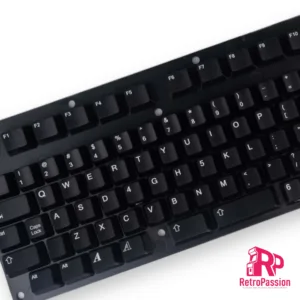
Amiga Black Keycaps A1200 A500 A600 & CDTV Black Keycaps  Layout Amiga Keycaps Set. Each sets contains 108 keycaps. The Keycaps can be used on ISO & ANSI keyboards, also included are extra keycaps to support the specific layout of the Mitsumi Amiga A600 Keyboard (green ribbon version NOT blue version).   Compatibility Notice
  • New Amiga Keycaps are compatible with Mitsumi Switches only!
  • Not compatible with Amiga 1000.
  What’s in the box
  • 96x Keycaps : Compatible with A1200 / A500 / A600 / A2000 / A3000 / A4000
  • Includes : Standard Return Key (ISO) / FAT Return Key (ANSI) & Additional long Shift Key (ANSI)
  • 12x Keycaps for Amiga A600 compatibility
  • 1x Standard Space bar
  • 1x Short Space bar (A600)
  • 100x Springs : Should you need to replace some old ones.
  • Small & Medium sized plastic clips for special key stabilizers.
  A perfect compliment to our Amiga A1200 cases available in Black, White and Translucent Purple   [gallery ids="27601,27600,27599"]      
Images are for illustrative purposes only.
   
£83.33 Ex. VAT Select options
GoDrive1200 Gotek A1200 A500
GoDrive1200 Gotek for Amiga A1200 and A500
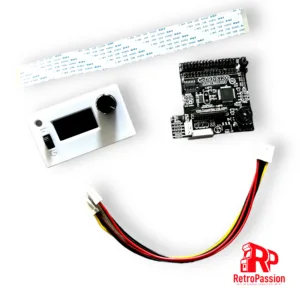
GoDrive1200 Gotek for Amiga A1200 and A500 is an upgrade that provides you both the use of your current internal floppy drive in the A1200 and A500 and also have access to a Gotek drive, so have the best of both worlds floppy drive and Gotek drive.   Features:
  • Large 1.3” OLED screen
  • Rotary encoder with switch
  • Activity LED light
  • Drive selector
  • USB socket
  • FlashFloppy Firmware
The unit requires no cutting of the case!!   Notes: Compatible with all Amiga 1200 units however there are exceptions as the A1200 came with different makes of floppy drive so if you have:
  • Mitsumi D357T2,
  • TEAC FD-235HF,
  • Panasonic JU-253-043P
Please ask for a SLIM version, as these drives are too long to fit standard GoDRIvE1200 model. Escom Amiga 1200 If you are owner of ESCOM A1200, GoDRIvE1200 will not work without modifying mainboard and replacing PC-compatible FDD fitted, for Amiga compatible one. There is a wire underneath the floppy connector that is bridging Pin 2 and Pin 34, this simply needs cutting out or de soldered.    
£99.99 Ex. VAT Select options
TF1260 TerribleFire A1200 Accelerator
TF1260 TerribleFire A1200 Accelerator – NO CPU
TF1260 TerribleFire Amiga 1200 Accelerator which hosts 64Mb Fast Ram, IDE connector (DOES NOT INCLUDE 68060 PROCESSOR). The TF1260 is one of the best 060 accelerators you can purchase for the Amiga 1200 And is the next step up after the TF1230 A1200 Accelerator add-on we sell for those that want that large speed jump. Full specs:
  • 128MByte of fast-ram.
  • IDE Interface - Driver required - ehide.device
  • Compatible with any A1200 motherboard revision.
  • Fits in your old/new stock A1200 case!!!
  • Just add your choice of 68060 processor!
  Processor support: The TF1260 TerribleFire supports all genuine 68060 processors including:
  • MC68060RC50 or XC68060RC50 (Complete with MMU & FPU)
  • MC68LC060RC50 or XC68LC060RC50 (MMU No FPU)
  • MC68EC060RC50 or XC68EC060RC50 (No MMU or FPU)
Only purchase this card if you know you have a genuine 68060 processor, The low end versions that have no MMU or FPU are more often genuine.   Prerequisites 
  • Timing fix is strongly recommended on your A1200 motherboard. We can do this free of charge if you send your board to us (return shipping does need to be covered).
  • Kickstart ROM 3.1, 3.1.4, 3.2, 3.x or 3.9 (not compatible with 3.0).
  What is Terriblefire? Well it's not what it's who, and that person is Stephen Leary who has designed a whole host of accelerators and ram cards for the Amiga A500, A1200 and Amiga CD32. These include many but the most common ones are:   NOTES:
  • For every TF1260 sold we donate a percentage of the sale to Stephen Leary to support further TF card developments and we also support our builders.
  • Timing fix is recommended on your A1200 motherboard. We can do this free of charge if you send your board to us (return shipping does need to be covered).
  • Cards sold as is, they are fully tested and a video will be shared of your card working before shipping.
  • We don't provide any advice or support for overclocking these cards, these are sold as 50Mhz. if you wish to overclock that is your choice. Heatsink and or fan required for overclocking.
 
£191.66 Ex. VAT Select options