Gotek Drive FlashFloppy – 0.96″ Display and Rotary Knob (Generic)
Gotek Drive FlashFloppy for and not limited to Acorn, Amstrad, Amiga, Apple, Atari, Spectrum, DOS / IBM XT PC, MSX.

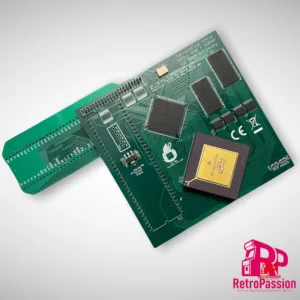
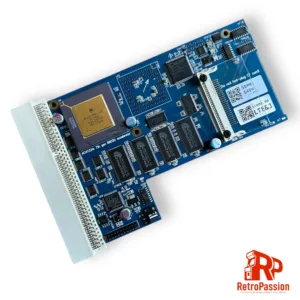
TF536 Accelerator for Amiga A500/A2000
TF536 accelerator a perfect upgrade for any Amiga A500, 500+ or A2000. Included is a gold top Motorola 68030 CPU clocked at 50mhz, 64MB of RAM, and a 2.5″ IDE connector for an CF HDD Card.
Full specs:
- MC68030RC50C Processor
- 64MByte of fast-ram.
- 44 Pin IDE connector
- Includes A500/A500+ CPU relocator
Prerequisites
- Kickstart ROM 3.1, 3.1.4, 3.2 to boot from IDE (available as an option below).
What is TerribleFire?
Well it’s not what it’s who, and that person is Stephen Leary who has designed a whole host of accelerators and ram cards for the Amiga A500, A1200 and Amiga CD32. These include many but the most common ones are:
- TF328 – 8Mb Fast Ram board and IDE socket for the Amiga CD32
- TF330 – 68030 Processor, 64Mb Fast Ram and IDE socket for the Amiga CD32
- TF534 – 68030 Processor, 4Mb Ram and IDE interface for the Amiga A500 and A500 Plus
- TF360 – 68060 Processor other specs TBC for the Amiga CD32
- TF1260 – 68060 Processor, 128Mb Ram and IDE Interface for the Amiga 1200
- TF1230 – 68030 Processor 128Mb Ram and IDE interface for the Amiga 1200
- TF4060 – 68060 Processor 128Mb Ram for the Amiga 4000
- TF1200 – Buffee Adaptor + 5.5Mb/8Mb (you will need the new Buffee Processor

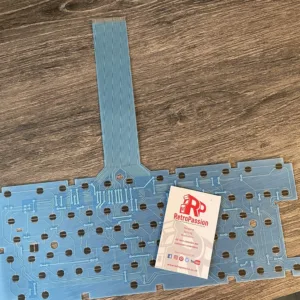
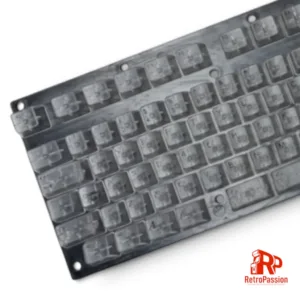
Amiga A600 Keyboard Membrane (New) BLUE
Amiga A600 Keyboard Membrane brand new BLUE. If you have issues with your Amiga A600 keyboard with missing keys or missing rows of keys the chances are the membrane needs replacing. There are 3 types of Mitsumi keyboard membrane for the Amiga A600:
- The A600 Blue Keyboard Membrane – (this one)
- The A600 Green Keyboard Membrane (model number 56C47A or 56C471A – maybe stamped A300-A)
- The A600 Green Keyboard Membrane (model number 56C47B or 56C471B – maybe stamped A300-B)
This membrane is compatible ONLY with the BLUE A600 membranes, if your current A600 membrane is GREEN these are different and are available to purchase here
What if you have missing keys or rows of keys on the Keyboard? Try these possible fixes first:
- Check the ribbon is inserted all the way in the connector on the Amiga A600 mainboard.
- If it’s only 1 or two keys the plunger may need a clean, strip down the keyboard and clean the plunger with some IPA.
- If it’s a whole row of keys missing its a very strong possibility that the membrane on your needs replacing.
- The final step is to trim off 1mm of the connector (the ribbon end that plugs into the A600 mainboard).
Do let us know if any of the above fixes help you!

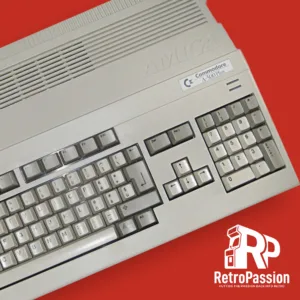
Refurbished Commodore Amiga 500 PLUS
Commodore Amiga 500 PLUS – Professionally refurbished
Technical Specifications
- Motorola 68000 (7.14Mhz) CPU
- 1Mb Chip Ram
- 2.04 Kickstart Rom
- 3.5″ Floppy Drive
- UK Layout Keyboard
What’s included?
- Professionally refurbished Amiga 500 + (PLUS) Unit (excluding mouse and PSU), these are options that can be added at the end.
What is Refurbished?
Each Commodore Amiga 500 + (PLUS) mainboard is professionally recapped and deep cleaned using a Ultrasonic cleaner, bathed using deionised water and professional grade PCB/Flux cleaning solution. Once completed it is dried and a full diagnostic test is completed. Each unit is thoroughly inspected make sure the Amiga 500 + (PLUS) worked as it did when it first came from the factory back in the 1980’s.
Case and keyboard is stripped and cleaned but due to age may show signs of use and age.
What is Ultrasonic cleaning?
Ultrasonic cleaning is a process that uses ultrasound (usually from 20–40 kHz) to agitate a fluid, this fluid is made up for this specific job which is to clean and remove any flux left over from recapping. We use deionised water (deionized depending where your from) and professional grade PCB cleaner.
An example of the results:


Want up add some extras?
We want you to have the Amiga you always wanted, and that’s why we can offer some great upgrades to your Amiga, for example: Extra fast ram for WHDLoad, Gotek drives etc. if there is something else or would like to add any mods let us know!
Shipping
UK shipping will be via Parcelforce and shipping cost will be calculated the checkout.
Worldwide shipping available simply contact us for a shipping quote.
Images of the Amiga 500 + (PLUS) is for illustrative purposes only, each unit will show signs of age and use. If you want photos of the Amiga 500 + (PLUS) we have please contact us.

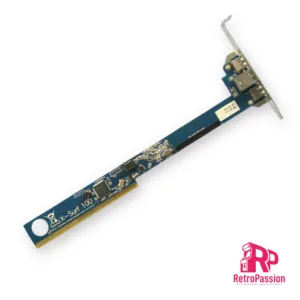
X-Surf 100 for all Commodore Amigas with Zorro Slots
X-Surf 100 is a networking card for all Amiga computers with Zorro slots. For the Amiga A2000 or Zorro-daughterboards for the A1200, it will run at Z2 speed. If installed in an Amiga A3000, A4000 or the respective tower versions, it will run at Z3 speeds, which is up to five times faster than Z2.
Key features:
- 100MBit physical link rate
- Sana-II device for use with OS2.0 up to OS3.9
- Officially supported in the Linux-m68k kernel
- Space- and power-saving design
- Gold plated Zorro contacts and stainless steel metal bracket
- Local expansion port for our high-speed USB module “RapidRoad”
Drivers can be downloaded from here.
Manual here
Wiki here
Requirements:
- TCP/IP stack such as Miami DX, AmiTCP, Genesis (included in OS3.9) or Roadshow
- Sufficient RAM and 68020 CPU or higher
- Kickstart/Workbench 2.0 or higher
- File transfer method for drivers to be transferred to the Amiga
Transfer rates of over 1600kBytes/s have been measured with the X-Surf-100. Please note that the classic Amiga architecture and the current TCP/IP stacks for the Amiga don’t allow saturating a 100MBit Ethernet link. Performance in your system may be slower due to CPU performance and programs running in multitasking.
Please note that we cannot guarantee the X-Surf-100 to work in third-party Zorro boards as used in tower conversions, such as boards made by Eagle, Mikronik, RBM or Elbox. The X-Surf-100 may or may not work in these boards. Although the bus interface is designed to tolerate many mistakes that the vendors of those third-party boards have made, we can only guarantee proper operation in original Commodore daughter boards. Should the card fail to work in such a third-party board, you may have to close the Z2 jumper and downgrade to Z2 speed. For operation in Z3 computers, the Buster-11 chip is recommended. If there is only one DMA master in the Z3 system, a Buster-9 may also be used.
Owners of the Merlin graphics card must have the latest hardware patches installed. Owners of the Mediator PCI/Zorro daughterboard must close the “swap” jumper.
The X-Surf-100 is officially supported in the Linux-m68k kernel.

A630 Rev 3 128Mb Accelerator 68030 50Mhz / FPU Amiga A600
A630 Rev 3 128Mb Accelerator for the Amiga 600 is the latest revision of the A630 modern turbo card with the classic 68030 Motorola processor running at 50Mhz and also includes an onboard FPU and has 128Mb Fast ram. Perfect for that sweet spot in speed and usefulness for Demos, WHDLoad* gaming, internet and so on. This will give any A600 a great speedboost in a compact unit.
Full specs:
- CPU MC68030, clocked on 50MHz.
- FPU 68882FN40 – synchronous or asynchronous clocking
- 128MB SDRAM Fast Ram.
- Cooling: Passive or Active. No heatsink or fan is included, options are below.
- PCMCIA Friendly.
Important Information:
MMULib’s for the A630 Accelerator
The A630 Accelerator requires the installation of MMULib’s and it very important you use the right ones for the kickstart ROM you are using:
3.1 Kickstart:
http://main.aminet.net/util/libs/MMULib.lha
http://main.aminet.net/util/libs/MMULib.readme
3.2, 3.2.1 or 3.2.2
Install the MMULib package that came with the installation CD ONLY and NOT the ones from Aminet.
Notes:
- Some demos or games may require disable “CPU CACHE” for better compatibility with the MC68000.
- The card is designed to work with 3.1 Roms and above including 3.2 and 3.2.1 of which can be purchased below.
- The Oscillator will need some insulation tape put on top to stop the A630 touching it.
- PCB Colour will vary.
*2Mb Chip ram is strongly recommended for WHDLoad which is available here
{PCB Colour will vary)

TF330 CD32 Accelerator with TF CD32 Riser
NO LONGER BEING PRODUCED
TF330 CD32 accelerator a perfect upgrade for your Amiga CD32. Included is a gold top Motorola 68030 CPU clocked at 50mhz, 64MB of RAM, 2.5″ IDE connector for an CF HDD Card, RGB socket, 2 x USB HID ports.
Full specs:
- MC68030RC50C Processor
- 64MByte of fast-ram.
- 44 Pin IDE connector
- Buffered DB23 (RGB out)
- 2 x USB HID ports with following support
- HID Keyboard support
- HID Mouse
- Support for Keyboard & Mouse combo
- Support for standard HID Gamepad :
- In Joystick mode with 3 buttons
- In CD32 Gamepad mode
- RTC – M6242 emulation – (Battery as an option)
Prerequisites
- USB HID Keyboard/Mouse/Joypad
What are USB HID Ports?
USB human interface device is a part of the USB specification for computer peripherals: it specifies a device class (a type of computer hardware) for human interface devices such as keyboards, mice, game controllers and alphanumeric display devices.
Using USB HID Ports
- After inserting USB HID devices (mouse, gamepad, keyboard + mouse combo) require to override the CD32 onboard game ports and are disabled and you need to use USB devices. You cannot mix and match. Override is indicated by LED2. Only a USB Keyboard can be used with the onboard CD32 game ports.
Supported USB devices:
Most standard USB HID mouse, keyboards and PC Gamepads. Some mouse with more than 3 buttons don’t work correctly, and combos with Bluetooth receivers.
What is TerribleFire?
Well it’s not what it’s who, and that person is Stephen Leary who has designed a whole host of accelerators and ram cards for the Amiga A500, A1200 and Amiga CD32. These include many but the most common ones are:
- TF328 – 8Mb Fast Ram board and IDE socket for the Amiga CD32
- TF330 – 68030 Processor, 64Mb Fast Ram and IDE socket for the Amiga CD32
- TF534 – 68030 Processor, 4Mb Ram and IDE interface for the Amiga A500 and A500 Plus
- TF536 – 68030 Processor, 64Mb Ram and IDE interface for the Amiga A500 and A500 Plus
- TF360 – 68060 Processor other specs TBC for the Amiga CD32
- TF1260 – 68060 Processor, 128Mb Ram and IDE Interface for the Amiga 1200
- TF1230 – 68030 Processor 128Mb Ram and IDE interface for the Amiga 1200
- TF4060 – 68060 Processor 128Mb Ram for the Amiga 4000
- TF1200 – Buffee Adaptor + 5.5Mb/8Mb (you will need the new Buffee Processor

FrameThrower 600 for Amiga A600 PiStorm600
FrameThrower 600 Amiga A600 adapter, this enables an output RTG desktop and native Amiga 15khz screen modes using single PiStorm accelerator HDMI output.

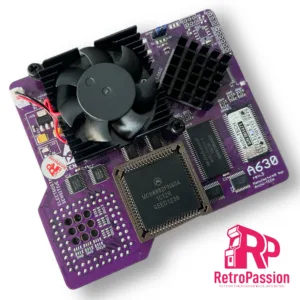
A630 Rev 3 Accelerator 68030 50Mhz, 64Mb, FPU Amiga A600 PURPLE
A630 Rev 3 68030 50Mhz inc FPU Amiga A600 PURPLE EDITION is the latest revision of the A630 modern turbo card with the classic 68030 Motorola processor running at 50Mhz and also includes an onboard FPU. Perfect for that sweet spot in speed and usefulness for Demos, WHDLoad* gaming, internet and so on. This will give any A600 a great speedboost in a compact unit.
Full specs:
- CPU MC68030, clocked on 50MHz.
- FPU 68882FN40 – synchronous or asynchronous clocking.
- 64MB SDRAM Fast Ram.
- Cooling: Active included.
- PCMCIA Friendly.
- PCB Colour – Purple
Important Information:
MMULib’s for the A630 Accelerator
The A630 Accelerator requires the installation of MMULib’s and it very important you use the right ones for the kickstart ROM you are using:
3.1 Kickstart:
http://main.aminet.net/util/libs/MMULib.lha
http://main.aminet.net/util/libs/MMULib.readme
3.2, 3.2.1 or 3.2.2
Install the MMULib package that came with the installation CD ONLY and NOT the ones from Aminet.
Notes:
- Some demos or games may require disable “CPU CACHE” for better compatibility with the MC68000.
- The card is designed to work with 3.1 Roms and above including 3.2 and 3.2.1 of which can be purchased below.
- An internal HDD/CF/SD Card needs to be installed for the A630 to boot.
*2Mb Chip ram is strongly recommended for WHDLoad which is available here

Amiga CD32 FMV Recapping Service
CD32 FMV recapping service, all board revisions. NOTE this is NOT a repair service.
Overseas recapping orders
Overseas orders are very welcome and we are able to provide you return shipping costs at the checkout.
To do this add any of our recapping services to your shopping basket and then at the checkout simply fill in the billing and shipping form including your telephone and email address (important) and click the ‘Request a quote‘ link.
You will receive an email within 24hrs with the shipping cost and you can then proceed with the order by clicking on the ‘Complete your order‘ within the email. There is no need to leave the checkout page open your web browser.