
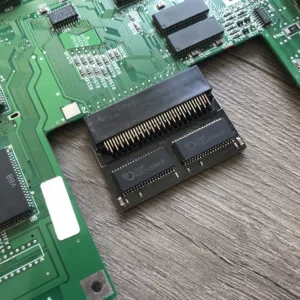
Amiga A600 1Mb Chip Ram Memory Expansion
Amiga A600 1Mb Chip Ram upgrade fits in the trapdoor of the Amiga 600. These cards are brand new and perfect in giving your Amiga 600 a little boost and compliments the Amiga 600 8Mb Fast ram upgrade as 2Mb chip ram is recommended if your looking to start using WHDLoad.
What is WHDLoad?
WHDLoad is a a solution where by the user can install hundreds of Amiga games on to a HDD/CF or SD card even if the game originally did not have the option of installing the game on to the internal HDD/CF/SD card. The vast majority of games have already been converted ready to go or you can create them yourself if you have the original game on a floppy disk/s. Also many great Amiga demos have been converted for WHDLoad.
1 Year RTB Warranty.
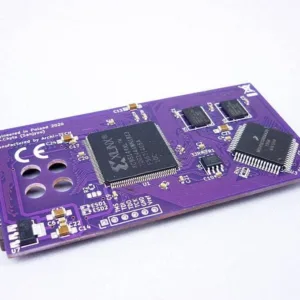
xT Accelerator Amiga A600, 28Mhz CPU, 11MB Fastram
xT Accelerator Amiga A600 with an onboard 28Mhz CPU with 11MB Fastram is one of the smallest and slimmest accelerator cards for the Amiga 600 computer, with some extra skill you can also fit the original HDD sled to it.The card is mounted on top of the MC68000 PLCC68 processor. All configuration options are available in the CLI.
Full specs:
- CPU MC68SEC000AA20, clocked on 28MHz.
- 11MB Fast Ram.
- MapROM Feature.
- PCMCIA Friendly – Ram needs to be set to 4MB.
- Embedded hardware DriveSWAP DF0/DF1 (Boot Selector).
Notes:
- Some demos or games may require disable “CPU CACHE” for better compatibility with the MC68000.
- The card is designed to work with 3.1 Roms and above including 3.2 and 3.2.1.
- PCB Colour will vary
*2Mb Chip ram is strongly recommended for WHDLoad which is available here
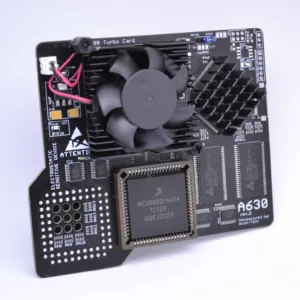
A630 Rev 3 Accelerator 68030 50Mhz 64Mb FPU Amiga A600
A630 Rev 3 Accelerator for the Amiga 600 is the latest revision of the A630 modern turbo card with the classic 68030 Motorola processor running at 50Mhz and also includes an onboard FPU. Perfect for that sweet spot in speed and usefulness for Demos, WHDLoad* gaming, internet and so on. This will give any A600 a great speedboost in a compact unit.
Full specs:
- CPU MC68030, clocked on 50MHz.
- FPU 68882 – synchronous or asynchronous clocking.
- 64MB SDRAM Fast Ram.
- Cooling: Active included.
- PCMCIA Friendly.
Important Information:
MMULib’s for the A630 Accelerator
The A630 Accelerator requires the installation of MMULib’s and it very important you use the right ones for the kickstart ROM you are using:
3.1 Kickstart:
http://main.aminet.net/util/libs/MMULib.lha
http://main.aminet.net/util/libs/MMULib.readme
3.2, 3.2.1 or 3.2.2
Install the MMULib package that came with the installation CD ONLY and NOT the ones from Aminet.
Notes:
- Some demos or games may require disable “CPU CACHE” for better compatibility with the MC68000.
- The card is designed to work with 3.1 Roms and above including 3.2 and 3.2.1 of which can be purchased below.
- An internal HDD/CF/SD Card needs to be installed for the A630 to boot.
- PCB Colour will vary.
*2Mb Chip ram is strongly recommended for WHDLoad which is available here
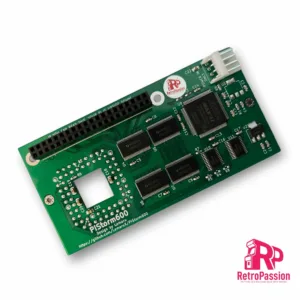
PiStorm600 Adaptor for Amiga A600
PiStorm600 for the Amiga A600 is an adaptor in which you plug in either a Raspberry Pi Model 3A+ or *Raspberry Pi Zero Model 2 (both not included) this provides a budget CPU accelerator for the Amiga 600. Also included is a file-based SCSI device, RTG graphics and several other optional enhancements.
Only the Pi 3-series is compatible with the current firmware version and only the Pi Model 3A+ and Raspberry Pi Zero Model 2 will physically fit in the A600 without modification and you can optionally support the PiStorm600 using M2.5 standoffs to help physically support it which are available as an option below.
Key Features
- Emulate 68010,68020,68030,68040,68060 Processors with or without FPU
- 128Mb Fastram.
- File-based SCSI device.
- RTG graphics from the Pi itself.
Notes:
Powering the A600/PiStorm
It is possible if you have a weak PSU or the Amiga 600 has not been recapped you may see instability issues as with any accelerator, you have a few options all of which are available below, If your using a Pi Zero2 then it is unlikely you will need to apply additional power. A Pi 3A+ can consume more power, but this is not often an issue until you start connecting USB devices, you have a few options below:
- You can add extra power via a floppy power connector splitter (available below) which is a new cable which splits the floppy power to power both your internal floppy drive and the PiStorm via its built in Molex connector (DO NOT ADD POWER OTHER THAN FROM THE AMIGA ITSELF OR TRY AND USE IT TO POWER OTHER DEVICES).
- Make sure your Amiga has been recapped, we offer 2 options Standard and Premium.
- Purchase a new Amiga PSU of which we also offer 2 versions, A600 Standard PSU or A600 Boost PSU which also as a 5VDC line adjustment to give a perfect 5 Volts to the Amiga 600.
We always suggest recapping in the first instance as tired caps can cause other issues like poor sound or prevent the Amiga booting up.
NOTE: PiStorm600 is a community project and will require some knowledge of the Amiga. Hardware which comes with a 1 year RTB warranty. hints and tips are available via the following Discord channel https://discord.com/invite/j6rPtzxaNW Also this product is still in BETA and while compatibility is very high, updates are always being released to increase compatibility with software and games.
We support developers by donating a percentage of sales, the PiStorm A600 adaptors are professionally manufactured and are RoHS compliant. This project was designed by Lemaru
*Using the Raspberry Pi Zero Model 2 is possible as mentioned but you do lose a little in performance.
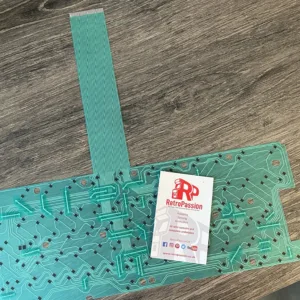
Amiga A600 Keyboard Membrane (New) GREEN
Amiga A600 Keyboard Membrane brand new GREEN. If you have issues with your Amiga A600 keyboard with missing keys or missing rows of keys the chances are the membrane needs replacing. There are 3 types of Mitsumi keyboard membrane for the Amiga A600:
- The A600 Blue Keyboard Membrane – available here
- The A600 Green Keyboard Membrane (model number 56C47A or 56C471A – maybe stamped A300-A)
- The A600 Green Keyboard Membrane (model number 56C47B or 56C471B – maybe stamped A300-B)
This membrane is compatible with the with all Green A600 membranes, if your current A600 membrane is BLUE these are different and are available to purchase here
What if you have missing keys or rows of keys on the Keyboard? Try these possible fixes first:
- Check the ribbon is inserted all the way in the connector on the Amiga A600 mainboard.
- If it’s only 1 or two keys the plunger may need a clean, strip down the keyboard and clean the plunger with some IPA.
- If it’s a whole row of keys missing its a very strong possibility that the membrane on your needs replacing.
- The final step is to trim off 1mm of the connector (the ribbon end that plugs into the A600 mainboard).
Do let us know if any of the above fixes help you!
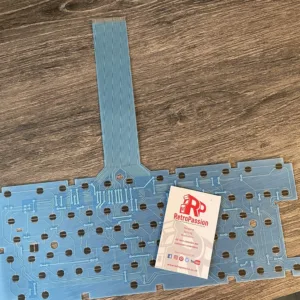
Amiga A600 Keyboard Membrane (New) BLUE
Amiga A600 Keyboard Membrane brand new BLUE. If you have issues with your Amiga A600 keyboard with missing keys or missing rows of keys the chances are the membrane needs replacing. There are 3 types of Mitsumi keyboard membrane for the Amiga A600:
- The A600 Blue Keyboard Membrane – (this one)
- The A600 Green Keyboard Membrane (model number 56C47A or 56C471A – maybe stamped A300-A)
- The A600 Green Keyboard Membrane (model number 56C47B or 56C471B – maybe stamped A300-B)
This membrane is compatible ONLY with the BLUE A600 membranes, if your current A600 membrane is GREEN these are different and are available to purchase here
What if you have missing keys or rows of keys on the Keyboard? Try these possible fixes first:
- Check the ribbon is inserted all the way in the connector on the Amiga A600 mainboard.
- If it’s only 1 or two keys the plunger may need a clean, strip down the keyboard and clean the plunger with some IPA.
- If it’s a whole row of keys missing its a very strong possibility that the membrane on your needs replacing.
- The final step is to trim off 1mm of the connector (the ribbon end that plugs into the A600 mainboard).
Do let us know if any of the above fixes help you!
A630 Rev 3 128Mb Accelerator 68030 50Mhz / FPU Amiga A600
A630 Rev 3 128Mb Accelerator for the Amiga 600 is the latest revision of the A630 modern turbo card with the classic 68030 Motorola processor running at 50Mhz and also includes an onboard FPU and has 128Mb Fast ram. Perfect for that sweet spot in speed and usefulness for Demos, WHDLoad* gaming, internet and so on. This will give any A600 a great speedboost in a compact unit.
Full specs:
- CPU MC68030, clocked on 50MHz.
- FPU 68882FN40 – synchronous or asynchronous clocking
- 128MB SDRAM Fast Ram.
- Cooling: Passive or Active. No heatsink or fan is included, options are below.
- PCMCIA Friendly.
Important Information:
MMULib’s for the A630 Accelerator
The A630 Accelerator requires the installation of MMULib’s and it very important you use the right ones for the kickstart ROM you are using:
3.1 Kickstart:
http://main.aminet.net/util/libs/MMULib.lha
http://main.aminet.net/util/libs/MMULib.readme
3.2, 3.2.1 or 3.2.2
Install the MMULib package that came with the installation CD ONLY and NOT the ones from Aminet.
Notes:
- Some demos or games may require disable “CPU CACHE” for better compatibility with the MC68000.
- The card is designed to work with 3.1 Roms and above including 3.2 and 3.2.1 of which can be purchased below.
- The Oscillator will need some insulation tape put on top to stop the A630 touching it.
- PCB Colour will vary.
*2Mb Chip ram is strongly recommended for WHDLoad which is available here
{PCB Colour will vary)
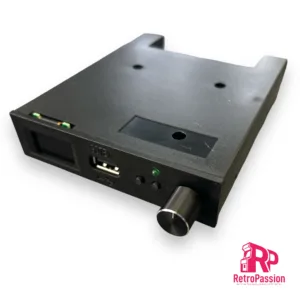
Gotek Drive Pre-Flashed with FlashFloppy, a 0.96″ Display and Rotary Knob (Generic)
Gotek Drive 0.96″ Display pre-flashed with FlashFloppy for and not limited to Acorn, Amstrad, Amiga, Apple, Atari, Spectrum, DOS / IBM XT PC, MSX.
This is the latest Gotek floppy emulator for retro computers with 3.5″ floppy disk drive bay, or for use externally or in a caddy. This will also work Amstrad / Spectrum or computers with 3″ disk drives or old PCs with 5.25″ drives and such. You will require the correct floppy IDE or Ribbon connection cables and 3D printed mount. Most computers can use the ones supplied within the machine and you can do a straight swap out for the existing old floppy drive (such as in DOS PCs and Amigas) but some machines may need extra leads/connectors (such as Spectrum +3).
Flashed with current latest FlashFloppy firmware and ready to use. Once installed, just insert a USB memory stick with your disk images/files on. Your computer will then boot from this floppy emulator or can also use it as a second drive.
Comes complete with Rotary select knob and large 0.96 OLED display screen
List of compatible devices:
Acorn Archimedes
Acorn BBC Micro
Amstrad CPC
Amstrad PCW
Amstrad PPC
Atari ST
Commodore Amiga
DEC
Dragon
IBM 3174
IBM PC
IBM PS/2
Kaypro
Memotech
MSX
NEC PC-98
Sharp
Sinclair QL
Spectrum
Tandy Color Computer
TI-99/4A
TSC Flex
UKNC, DVK
Akai
E-mu ESI-32
Ensoniq
General Music (GEM)
Korg
Kurzweil
Roland
Sequential Circuits Prophet 3000
Yamaha
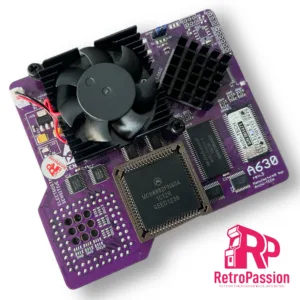
A630 Rev 3 Accelerator 68030 50Mhz, 64Mb, FPU Amiga A600 PURPLE
A630 Rev 3 68030 50Mhz inc FPU Amiga A600 PURPLE EDITION is the latest revision of the A630 modern turbo card with the classic 68030 Motorola processor running at 50Mhz and also includes an onboard FPU. Perfect for that sweet spot in speed and usefulness for Demos, WHDLoad* gaming, internet and so on. This will give any A600 a great speedboost in a compact unit.
Full specs:
- CPU MC68030, clocked on 50MHz.
- FPU 68882FN40 – synchronous or asynchronous clocking.
- 64MB SDRAM Fast Ram.
- Cooling: Active included.
- PCMCIA Friendly.
- PCB Colour – Purple
Important Information:
MMULib’s for the A630 Accelerator
The A630 Accelerator requires the installation of MMULib’s and it very important you use the right ones for the kickstart ROM you are using:
3.1 Kickstart:
http://main.aminet.net/util/libs/MMULib.lha
http://main.aminet.net/util/libs/MMULib.readme
3.2, 3.2.1 or 3.2.2
Install the MMULib package that came with the installation CD ONLY and NOT the ones from Aminet.
Notes:
- Some demos or games may require disable “CPU CACHE” for better compatibility with the MC68000.
- The card is designed to work with 3.1 Roms and above including 3.2 and 3.2.1 of which can be purchased below.
- An internal HDD/CF/SD Card needs to be installed for the A630 to boot.
*2Mb Chip ram is strongly recommended for WHDLoad which is available here
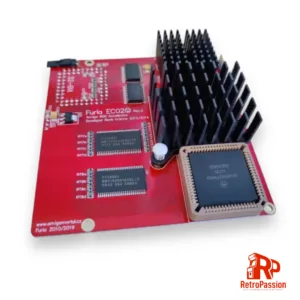
FURIA Amiga A600 accelerator (Passive Cooler)
FuriaEC020 is an accelerator card for Amiga A600 computers designed by Boris Krizma (Slovak Amiga HW developer) It’s equipped with CPU Motorola MC68EC020/25 (OC33) MHz and FPU Motorola MC68882/40 MHz, and with onboard 9.5 megs of fast memory. The quick access to the memory makes this little card a real monster, as it makes the Amiga more than 10 times faster, than the original Amiga 600.
The card has also ability to map ROM into the Fast RAM, tested with 256 kB, 512 kB and also 1024 kB ROMs. The card also speeds up Amiga 600 IDE port. The device can be easily controlled by tool FuriaTune software written by Martin Kuchinka. To enable support for onboard PCMCIA port, you need to remove 4 megabytes of Fast RAM by pressing Control+Amiga+Amiga for 3 seconds.
Features:
- CPU 68EC020/25 MHz (OC33)
- FPU 68882
- 9.5MB Fast RAM
- Maprom function
- PCMCIA friendly
- Highest quality PLCC bottom socket – stable and solid FIT (AMPHENOL) – high temp resistant
- Firmware 14.1
- PCB colour may vary
A630 Rev 3 Accelerator (Bare board)
A630 Rev 3 Accelerator for the Amiga 600 is the latest revision of the A630 modern turbo card. designed for the the classic 68030 Motorola processor (NOT INCLUDED) running at 50Mhz and add an additional FPU (NOT INCLUDED). Perfect for that sweet spot in speed and usefulness for Demos, WHDLoad* gaming, internet and so on. This will give any A600 a great speedboost in a compact unit.
Full specs:
- CPU socket for the Motorola MC68030 clocked on 50MHz CPU (CPU NOT INCLUDED)
- FPU socket for the 68882FN40 (FPU NOT INCLUDED)
- 64MB SDRAM Fast Ram.
- PCMCIA Friendly.
We also sell a fully bullt A630 Rev 3 with CPU and FPU.
Important Information:
MMULib’s for the A630 Accelerator
The A630 Accelerator requires the installation of MMULib’s and it very important you use the right ones for the kickstart ROM you are using:
3.1 Kickstart:
http://main.aminet.net/util/libs/MMULib.lha
http://main.aminet.net/util/libs/MMULib.readme
3.2, 3.2.1 or 3.2.2
Install the MMULib package that came with the installation CD ONLY and NOT the ones from Aminet.
Notes:
- Some demos or games may require disable “CPU CACHE” for better compatibility with the MC68000.
- The card is designed to work with 3.1 Roms and above including 3.2 and 3.2.1 of which can be purchased below.
- The Oscillator will need some insulation tape put on top to stop the A630 touching it.
*2Mb Chip ram is strongly recommended for WHDLoad which is available here
Image for illustration only – no CPU or FPU is included and PCB colour will vary.
A630 Accelerator Amiga A600 68030 50Mhz, 128Mb, FPU PURPLE
A630 Accelerator Amiga A600 68030 50Mhz inc FPU PURPLE EDITION is the latest revision of the A630 modern turbo card with the classic 68030 Motorola processor running at 50Mhz and also includes an onboard FPU. Perfect for that sweet spot in speed and usefulness for Demos, WHDLoad* gaming, internet and so on. This will give any A600 a great speedboost in a compact unit.
Full specs:
- CPU MC68030, clocked on 50MHz.
- FPU 68882FN40 – synchronous or asynchronous clocking.
- 128MB SDRAM Fast Ram.
- Cooling: Active included.
- PCMCIA Friendly.
- PCB Colour – Purple
Important Information:
MMULib’s for the A630 Accelerator
The A630 Accelerator requires the installation of MMULib’s and it very important you use the right ones for the kickstart ROM you are using:
3.1 Kickstart:
http://main.aminet.net/util/libs/MMULib.lha
http://main.aminet.net/util/libs/MMULib.readme
3.2, 3.2.1 or 3.2.2
Install the MMULib package that came with the installation CD ONLY and NOT the ones from Aminet.
Notes:
- Some demos or games may require disable “CPU CACHE” for better compatibility with the MC68000.
- The card is designed to work with 3.1 Roms and above including 3.2 and 3.2.1 of which can be purchased below.
- An internal HDD/CF/SD Card needs to be installed for the A630 to boot.
*2Mb Chip ram is strongly recommended for WHDLoad which is available here