
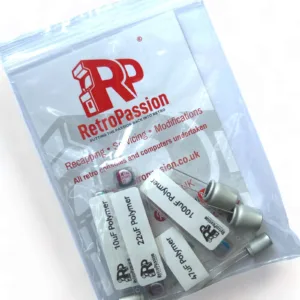
Amiga A600 Capacitor Kit Polymer (Premium)
Amiga A600 Capacitor Kit Polymer (Premium). Polymer capacitors compared to the ‘standard’ liquid electrolyte capacitors, organic polymer is a solid electrolyte, so these capacitors will never leak. These types are still within the Commodore specification compared to other type of capacitors that are used like tantalum or polymer tantalums which should be avoided.
We only use quality capacitors and use these in our own Amiga A600 premium recapping service.
- Complete set of capacitors for Amiga 600 mainboard
- Compatible with both PAL and NTSC models
- Compatible with 1.1,1.3, 1.5 and 2B revisions
Package includes:
- Full set of SMD and through hole capacitors.
It is assumed the right tools and techniques are used in replacing capacitors as we cannot accept any responsibility for any damage to your board using our Amiga A600 Capacitor Kit. If your an sure we offer a range of Amiga recapping services including fixs and ultrasonic cleaning, contact us for any further information or search Amiga recapping services
Image for illustration only
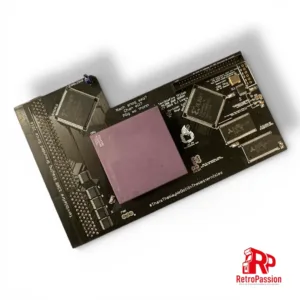
TF1260 Amiga A1200 Accelerator 68060 50Mhz, 128Mb Ram
TF1260 Amiga A1200 accelerator hosts 128Mb Fast Ram, IDE connector with CPU options available below.
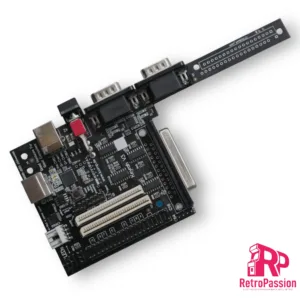
Keyrah V3 – Commodore Amiga, Atari ST, PC
Keyrah V3 allows you to connect original keyboards of classic computer systems like the Commodore 64 or the Amiga 1200 to modern computers (e.g. PC, Mac, or the Raspberry Pi) via USB.
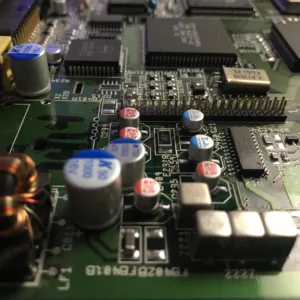
Amiga 4000 Recapping Service (Premium)
Amiga 4000 recapping service (Premium), all board revisions, NOTE this is NOT a repair service.
- Check of the board before recapping is begun.
- Removal of existing capacitors.
- Cleanup and preparation of area.
- Replace using Polymer Panasonic/Wurth/KEMET capacitors. (these will never leak)
- Retest (Video, Audio, Floppy Boot, IDE).
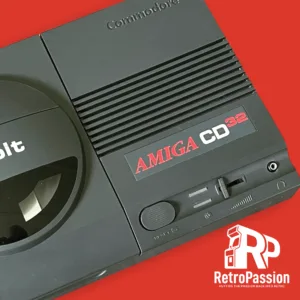
Refurbished Commodore Amiga CD32
Commodore Amiga CD32 – Professionally Refurbished
Technical Specifications:
- Motorola 68020 (14Mhz) CPU
- 2Mb Chip Ram
- 2 x CD-Rom Drive
- AGA Chipset
What’s included?
- Refurbished Amiga CD32 Unit
- CD32 Controller
- PSU (UK)
What is refurbished?
Each Commodore Amiga CD32 mainboard is professionally recapped (standard or Polymer is avilable at extra cost) and deep cleaned using a Ultrasonic cleaner, bathed using deionised water and professional grade PCB/Flux cleaning solution. Once completed it is dried and a full diagnostic test is completed. Each unit is thoroughly inspected make sure the Amiga CD32 works as it did when it first came from the factory back in the 1990’s. Case is cleaned but due to age may show signs of use and age.
Checkout the work on the portfolio page here
Want up add some extras?
We want you to have the Amiga you always wanted, and that’s why we can offer some great upgrades to your Amiga, for example: Extra fast ram for WHDLoad!
Shipping
UK shipping will be via Parcelforce and shipping cost will be calculated the checkout.
Worldwide shipping available simply contact us for a shipping quote.
Images of the Amiga CD32 are for illustrative purposes only, each unit will show signs of age and use. If you want photos of the CD32’s we have please contact us.
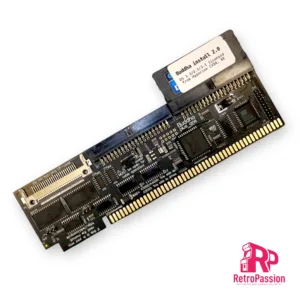
Buddha Plus One IDE Controller Commodore Amiga
Buddha Plus One IDE Controller for Commodore Amiga with zorro slots (2023 version) is a IDE controller for Amiga computers with Zorro slots (Amiga A2000, A3000, A4000 CheckMate 1500 Plus with Zorro interface) and provides you connectivity for hard drives,CD-Rom Drives, DVD Drives (both readers and writers), and of course CF cards and SSD with PATA interfaces..
Buddha Plus One features:
- Two IDE ports
- One CF card slot
- 1Mb of Fast Ram
- GUI-based settings tool
- Elaborate LED concept
- High Speed
- Multiple measures to prevent wrong installations
The two IDE ports and the CF card slot are non-conflicting. This means that you can use up to five mass-storage devices at the same time, and if that’s not enough, you can add more Buddha controllers to the same computer!
Added memory
While the combination of a mass-storage controller and memory on the same card is not a new invention, the 1MByte of true 0-wait state fast memory of the Buddha Plus One controller does not conflict with existing memory cards. If you are expanding a system that has already maxed out it’s 8MByte of Z2 space (no matter if it’s fastmem, a PC bridge card or RTG graphics), Buddha Plus One will still add 1MByte of memory, without using any of the precious Z2 expansion space. A2000 users can choose to map the memory to one out of two addresses: The legacy “trapdoor memory” address $c0.0000, where it adds compatibility with old software titles (especially for machines that have been expanded to 1MByte or 2MBytes of chip ram), or to the normally-unused address space at $a0.0000. A3000 and A4000 users can only use address $a0.0000. Memory is not available if installed in a Zorro expansion of an A1200.
Robust against installation errors
Buddha Plus One has a long heritage and we’ve learned from numerous support cases of the past decades that in the heat of the moment, you may accidentally plug in the card the wrong way round. For the first time in Amiga history, we’re presenting mechanical and electrical measures to either prevent wrong installation, or to keep the controller safe from harm if you manage to plug in the card the wrong way round. Just flip the card around and it’ll work as if nothing bad ever happened.
Easy configuration
While previous versions of the Buddha controller could only be controlled with command line tools, Buddha Plus One introduces a GUI that is provided in the ROM of the controller, so no software installation and/or download is required. This GUI will even work with Kickstart V1.3!
Elaborate LED concept
The original Amiga computers only have a single HD LED. Buddha Plus One will unite all access-LEDs (including onboard IDE/SCSI accesses) into a single one without soldering or complicated configuration steps. Two LED cables are included with Buddha Plus One, making LED wiring easy without soldering, and without the need to drill holes for additional LEDs into precious original cases. The LED output will automatically sense how many LEDs there are in a row (one in case of A2000/A4000 or two in case of the A3000), and the LED input of Buddha Plus One will accept any polarity.
Quick boot support
The Amiga can start blazingly fast. Amiga users are so used to having a usable desktop within seconds after switching on that every single additional second is already a reason to be worried. Buddha Plus One gives the user various options to skip unnecessary wait times: The maximum time that Buddha will wait for a drive to spin up can be set in the graphical startup menu. Unused ports can be switched off, and if you have an onboard IDE/SCSI controller that you’re not using any more, it can also be switched off in the Buddha Plus One configuration, saving several ten seconds of boot time.
Improved speed
Let’s face it: Buddha has never been a speed demon. The Z2 bus with it’s 7MHz and 16 bits has it’s limits, and that’s in the neighbourhood of 2.3MBytes/second, measured with a medium-speed 68020 or 68030 CPU. However, there’s two special cases where Buddha Plus One adds significant transfer speed: First, an un-accelerated A2000 would struggle to reach 800KBytes/s with a 7MHz 68000 CPU on previous versions of the Buddha controller. Buddha Plus One now adds hardware acceleration that improves transfer rates with 68000 CPUs by about 35%. Buddha Plus One with a 7MHz CPU beats the “magical” 1MByte/second barrier by a large margin. The second special configuration where Buddha Plus One can add speed is in the Z4 board for an A1200 computer. Z4 boards are also known as “Elbox Z4” or “Winner Z4” Boards, and they sport a “Fast-Z2” mode that can add up to 50% to measurable transfer speed. We recommend to only activate this mode if only CF cards or DOMs are used. Stability with long IDE cables may not be given.
Extended software installation
Buddha Plus One comes with a DOM (disk-on-module) pre-installed. This DOM contains our automatic partition/install tool and licensed copies of Amiga OS 1.3, 2.1 and 3.1. Partitioning and installing a CF card or hard drive has never been easier! Even if you have lost your OS installation floppies or your floppy drive is defective, you can bring your Amiga to life within minutes. If a CD ROM drive is found, drivers and file system are also automatically installed, letting you install more software or Amiga OS V3.2 from CD (Amiga OS3.2 is available separately in this shop). If there is any version of the X-Surf networking card in your computer, you can continue to install a TCP/IP stack and network GUI. This will break the vicious circle of having to transfer software to the Amiga in order to install a transfer method for software.
What’s included:
- Buddha Plus One
- LED extension 24cm
- LED connection cable 24cm
- Instruction manual (English/German)
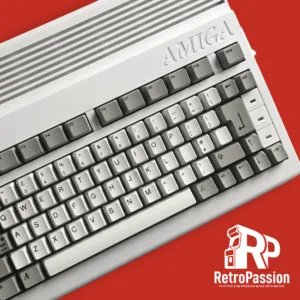
Refurbished Commodore Amiga A600
Refurbished Commodore Amiga A600.
Specifications:
- Motorola 68000 (7.14Mhz) CPU
- 1Mb Chip Ram
- 2.04 Kickstart Roms
- 3.5″ Floppy Drive
- UK Layout Keyboard
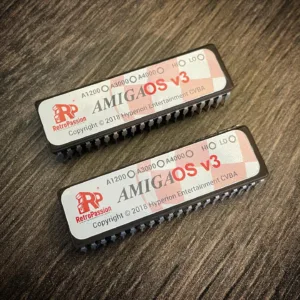
AmigaOS 3.2.3 A1200 ROM Burning Service for Amiga A1200
AmigaOS 3.2.3 A1200 ROM Burning Service for Amiga A1200, within this service we will burn the Kickstart ROM files to 2 x physical kickstart ROMs both HI and LO which can be installed in your real Amiga 1200.
What you will receive:
- Physical 3.2.3 Kickstart HI ROM
- Physical 3.2.3 Kickstart LO ROM
The Process:
This service requires proof of your purchase of AmigaOS 3.2 a screenshot of a receipt will be fine. Please note ONLY customers who already bought AmigaOS 3.2 can purchase this service. If the buyer is unable to provide proof of the purchase the transaction will be cancelled and funds will be refunded minus any processing fees (if PayPal was used to purchase this service).
We are proud to be an official Hyperion reseller.
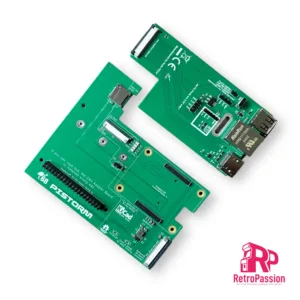
PiStorm32-Lite CM4 Adaptor with Expansion Breakout
PiStorm32-Lite CM4 adaptor with expansion breakout with HDMI, Ethernet, USB. This is designed to be attached to the PiStorm32-lite adaptor to allow you add an Raspberry PI CM4 module.
What’s included:
- CM4 Adapter (Allows connection of Expansion Breakout and Compute Module 4)
- Passive Cooler
- Expansion Breakout that provides HDMI, USB and Ethernet Ports
- Flex wire 40Pin 20cm
- Printed IO cover (3D printed)
We also just sell the Pistorm32-Lite kits with Raspberry Pi 3A+ here
NOTE: The PiStorm32-Lite CM4 product is an open source project and will require some knowledge of the Amiga
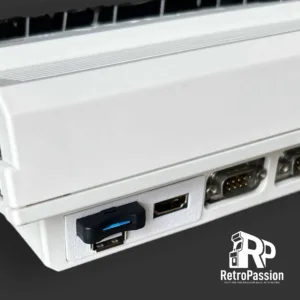
PiStorm32-Lite Rear Panel HDMI – USB – SD
- White
- Black
- Gray
When purchasing, leave a note of the colour required.
Whats included:
- Rear Panel
- Micro HDMI Extension Cable
- MicroSD Extension Cable
- USB Extension Cable
- M3 Screw and nut
This is for the Pistorm32-Lite with Raspberry Pi3A+
Checkout the other great work the developer has created here
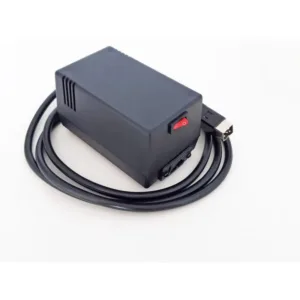
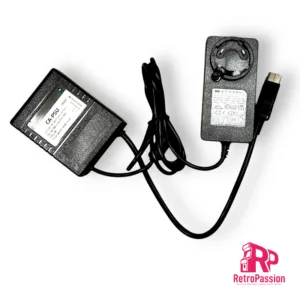
Amiga CD32 PSU 50W Brand New
Amiga CD32 PSU, these are brand new and modern with It’s 50W (55W peak) of total combined output power making it nearly 2x times stronger than original Commodore Amiga PSU and 2x smaller in dimensions & weight.
Key features:
- Stabilized & filtered 5VDC up to 4A output (4.4A peak)
- Stabilized & filtered 12VDC up to 2A output (2.2A peak)
- Carefully calibrated for Amiga 500 reference load
- Active & passive over voltage protection for main +5VDC line
- Over current protection for all output lines
- Fully isolated & fused on AC side
- Power On/Off switch
- Long output cable (1.8m) with circular DIN 5-pin plug.
- Detachable input AC cable for all versions (cable included)
- Weight only 0.4 KG (2x less than original PSU)
- Runs COLD!
- Safety standards: UL60950-1, TUV EN60950-1, ANSI/AAMI ES60601-1, TUV EN60601-1, IEC60601-1
- Manufactured by Electroware
- UK Stock
Warning!
Risk of electrical shock and energy hazard when opened. All failures should be examined by a qualified technicians only. Risk of fire or electrical shock. The ventilation holes should be protected from foreign objects or dripping liquids. Please do not install power supplies in places with high ambient temperature or close to the heat source. Enclosed power supplies are intent to work in indoor locations, it’s not allowed to use power supplies outdoor, in dust or high moisture. Output current and output wattage must not exceed the rated values.
This replacement Amiga PSU has been designed for Commodore Amiga CD32 vintage computer systems only and should be considered as an integral component of Amiga computer system. Do not connect to any other devices as it’s not a general purpose PSU. Manufacturer is not responsible for any consequences of unauthorised or arbitrary repairs, modifications or incorrect usage. Please notice that new, properly working replacement Amiga PSU is reducing the system’s potential fail rate but still is not guaranteeing that entire Amiga system will work correctly (it’s >30 years old).