Sum A600 USB Keyboard Adaptor

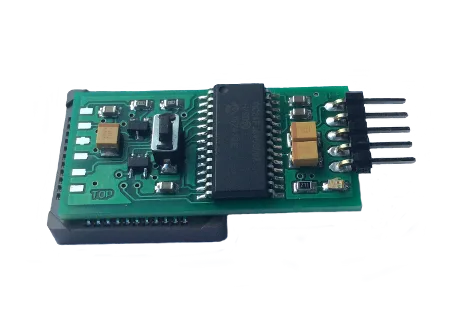
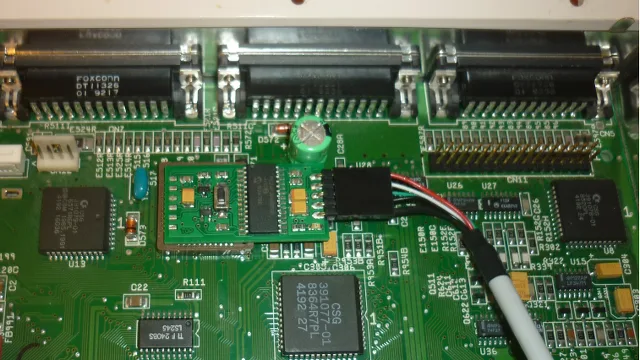
Sum A600 USB Keyboard adaptor is a USB interface for HID keyboards (ONLY) without the need for installing additional AmigaOS software drivers. Device’s installation procedure consists of simply attaching it the U7 chip located on A600’s motherboard. Additional feature of the adapter is its “Bootloader” function allowing future firmware upgrades.
Sum A600 USB comes with dedicated configuration mode, which becomes available when you by pressing both the  Right-Shift + Pause keys together. User preferences are saved to the built-in EEPROM memory.
Key Features of the Sum A600
  • Support for both USB HID and USB-PS / 2 keyboards (Not gaming or LED backlit keyboards).
  • A600 compatibility (U7 chip-attached).
  • Built-in USB stack.
  • Configuration mode for PC keyboard (activated by R-Shift + Pause key combination),
  • Configuration mode for Mac keyboard (activated by R-Shift + F19 key combination).
  • Built-in EEPROM memory enabling user preferences storage.
  • “Bootloader” function allowing future firmware upgrades.
  • “Status” indicator LED providing information about device’s state.
  • built around 16-bit Microchip microcontroller utilizing nanoWatt technology.
  • Non-blocking keyboard A600 – You can still use the inbuilt A600 keyboard.
Entering configuration mode (R-Shift + Pause)
  • F1 – RESET type – software (A2000, A3000, A4000, CD32, CDTV) or hardware (A600, A1200),
  • F2 – mapped Amiga Right to Alt Right,
  • F10 – view keycode (on / off),
  • F12 – display configuration


Amiga keys USB keyboard
Amiga reset CTRL + L-Win + R-Win
CTRL + L-Alt + R-Alt
CTRL + L-Alt + Del
Help F12
L-Amiga L-Win
R-Amiga R-Win


This product has been discontinued.
SKU: SUM-A600 Categories: , Tags: , ,

Description

Sum A600 USB Keyboard adaptor is a USB interface for HID keyboards (ONLY) without the need for installing additional AmigaOS software drivers. Device’s installation procedure consists of simply attaching it the U7 chip located on A600’s motherboard. Additional feature of the adapter is its “Bootloader” function allowing future firmware upgrades.
Sum A600 USB comes with dedicated configuration mode, which becomes available when you by pressing both the  Right-Shift + Pause keys together. User preferences are saved to the built-in EEPROM memory.
Key Features of the Sum A600
  • Support for both USB HID and USB-PS / 2 keyboards (Not gaming or LED backlit keyboards).
  • A600 compatibility (U7 chip-attached).
  • Built-in USB stack.
  • Configuration mode for PC keyboard (activated by R-Shift + Pause key combination),
  • Configuration mode for Mac keyboard (activated by R-Shift + F19 key combination).
  • Built-in EEPROM memory enabling user preferences storage.
  • “Bootloader” function allowing future firmware upgrades.
  • “Status” indicator LED providing information about device’s state.
  • built around 16-bit Microchip microcontroller utilizing nanoWatt technology.
  • Non-blocking keyboard A600 – You can still use the inbuilt A600 keyboard.
Entering configuration mode (R-Shift + Pause)
  • F1 – RESET type – software (A2000, A3000, A4000, CD32, CDTV) or hardware (A600, A1200),
  • F2 – mapped Amiga Right to Alt Right,
  • F10 – view keycode (on / off),
  • F12 – display configuration


Amiga keys USB keyboard
Amiga reset CTRL + L-Win + R-Win
CTRL + L-Alt + R-Alt
CTRL + L-Alt + Del
Help F12
L-Amiga L-Win
R-Amiga R-Win


Additional information

Weight 0.100 kg
Dimensions 15 × 10 × 2.5 cm

Reviews

There are no reviews yet.

Only logged in customers who have purchased this product may leave a review.

This Product have no Question..!