
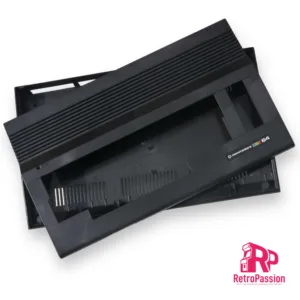
Haruku Green Asahi A1200 Amiga Case
Asahi Amiga A1200 Case Haruku Green

Asahi Amiga A1200 Case Haruku Green manufactured by A1200.net

What’s included?

  • Top case including enhancements
  • Bottom case including enhancements
  • Enhanced bottom trapdoor with extra vents.
  • Enhanced rear trapdoor + extra plastic holder DVI / VGA shaped hole.
  • Rubber feet
  • Set of screws
How are these brand new?

In 2016 840 Amiga users made it possible in supporting a Kickstarter to reproduce the Amiga 1200 case, the new cases are made using Injection Molding manufacturing technique to produce top and bottom shells as well as trapdoors and parts. The process implies the use of 3 new moulds, the first one is for the top shell, second mould for the bottom shell and last one for trapdoors and parts, all produced using brand new moulds.


What is the Asahi Series of A1200 cases?

The Asahi series of A1200 cases are limited edition, once gone, they are gone. The word ‘Asahi’ is a Japanese word that means “morning” and “sunlight”. It is derived from the Japanese words asa meaning “morning” and hi meaning “sunlight”. The name symbolizes the start of a new day, and is associated with hope and new beginnings. The limited edition series are available in the following colours:

Akuma RedThe word ‘Akuma’ in Japanese means ‘Devil’. With Devil Red we reference the Red Demon. A historic figure and one of the four Guardians of the Tokugawa in Japanese history. This color Red is a very dark Wine Red but brightens up to a blood red when light emits through it.

Arashi GreyThe word ‘Arashi’ in Japanese means ‘Storm’. The case is a very dark grey, but when light emits through it turns into a brighter grey with clear blue accents.

Haruku Green – The word ‘Haruku’ is the Japanese word for ‘Hulk’. This is an ode to the big hulks of oaks you find in Japan. The case is a very dark green, but when light emits through it turns into a brighter richer green.

Shinkai Blue –The word ’Shinkai’ in Japanese means ‘Deep Sea/Ocean’ The case is a rich blue translucent which was close to the Commodore Blue but allow the right light and viewing angle to give it a dark purple hue. The blue brightens up when light emits through it.


Enhancements galore:

The Amiga community has never died and some have produced some great add-ons over the years to make sure the Amiga is still relevant and useful today as it was back in the 80’s/early 90s and these cases take full advantage of that weather that’s simply transferring your existing motherboard from your existing Amiga 1200 or have a luxury of installing a MiST FPGA Board. Below are few more enhancements:


External CF Adaptor


A CF slot can be opened up on the side of the A1200 case to allow easy access to what would be the CF card within the A1200 itself.


MiST FPGA Board


MiST is a FPGA based modern board that implements classic 16bit computers like the Commodore Amiga, Atari ST and 8bit systems like the Commodore 64, ZX-Spectrum, MSX, Atari XL/VCS, Apple II, Colecovision, Sega Master System, NES, SNES as well as Arcade machines. The primary difference between the MiST is that its NOT emulation.

The Amiga A1200 purple case has mounts to mount the MiST FPGA.


Raspberry PI


Yes you can mount a Raspberry PI 2/3 within the new A1200 case with the use of the mounts already part of the case for a nice clean solution.


Keyrah V3


Keyrah V2

Keyrah V3 for the Amiga 1200/600, C64, VIC 20 and C16Keyrah V3 is an IO adaptor that allows you to use the original keyboards of the Commodore Amiga 600 and 1200, Commodore 64, VIC-20 and C-16 within their respective cases. The purpose of this you can then install a Raspberry PI which uses the original keyboard of that computer and providing 2 x D9 ports. The new Amiga 1200 case has mounts are located at middle top of bottom shell. This location make the keyboard adapter available for Raspberry Pi or MiST board. Original Amiga 1200 keyboard ribbon will fit nicely just at the right place on the keyboard adapter board. I/O connectors are accessible through rear panel I/O slots.


So what are the differences with the original Commodore case?

  • All screws are secured with metal brass inserts. No more broken plastic clips.
  • The bottom trapdoor has extra vents for a better case air flow.
  • 2 new rear trapdoors are available to accommodate VGA and DVI. The third one is a Plain door.
  • The case supports the following modern devices : Raspberry Pi©, MiST© FPGA, Keyrah© V3 keyboard adapter, RapidRoad© Double USB and Lotharek© HxC Floppy emulator, Flashfloppy


*Keycaps NOT included but available as an option.


£99.99 Ex. VAT Read more
Commodore C64 C64C Case Black New
Commodore C64 and C64c Case New Black

Commodore C64 or C64C brand new cases. If your C64 is yellowed, has signs of wear, ugly holes, or you just want to give some love to your Commodore 64, then one of these cases is right for you. You could even build a brand new C64, rehouse your existing motherboard and keyboard, or even install the Keyrah v3.

“Retro Black” colour scheme following the colours of the Commodore 264 series (C16, C116 and Plus/4 computers).

Package includes:

  • Top half of case with sticker applied
  • Bottom half case without sticker
  • Two rubber stands, ten self-tapping plastic screws
  • User guide (colour printed)
  • White box with “Commodore” logo stickers
  • Shipping includes outer (brown) box


£62.49 Ex. VAT Read more
Amiga A600 Keyboard Membrane
Amiga A600 Keyboard Membrane (New) GREEN

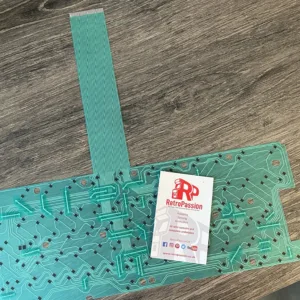
Amiga A600 Keyboard Membrane brand new GREEN. If you have issues with your Amiga A600 keyboard with missing keys or missing rows of keys the chances are the membrane needs replacing. There are 3 types of Mitsumi keyboard membrane for the Amiga A600:

  • The A600 Blue Keyboard Membrane –  available here
  • The A600 Green Keyboard Membrane (model number 56C47A or 56C471A – maybe stamped A300-A)
  • The A600 Green Keyboard Membrane (model number 56C47B or 56C471B – maybe stamped A300-B)

This membrane is compatible with the with all Green A600 membranes, if your current A600 membrane is BLUE these are different and are available to purchase here

What if you have missing keys or rows of keys on the Keyboard? Try these possible fixes first:

  • Check the ribbon is inserted all the way in the connector on the Amiga A600 mainboard.
  • If it’s only 1 or two keys the plunger may need a clean, strip down the keyboard and clean the plunger with some IPA.
  • If it’s a whole row of keys missing its a very strong possibility that the membrane on your needs replacing.
  • The final step is to trim off 1mm of the connector (the ribbon end that plugs into the A600 mainboard).

Do let us know if any of the above fixes help you!


£24.99 Ex. VAT Read more
ACA500 Plus Enclousure/Case Amiga
ACA500Plus Case Amiga A500 A500 Plus

ACA500Plus case (transparent), the perfect enclosure for the ACA500Plus with all parts are laser cut.

What’s included:

  • 7 acrylic parts, transparent
  • 6 adhesive feet,
  • 8 threaded bolts,
  • 13 screws,
  • 1x nut,
  • 3 acrylic discs (washers).
  • Assembly instructions (around 15/20 mins)

There is a small assembly video on YouTube here .

Note on ventilation:
The case has ventilation slots on both the top and bottom for passive cooling.
Depending on the hardware installed, the temperature development in the housing and the installed components must be taken into account!


£39.99 Ex. VAT Add to basket
Intel Pentium III PC Case Badge Black

Intel Pentium III PC Case Badge Black, perfect for any PC case, add a touch of nostalgia from a great Pentium 3 era in PC history. These badges are printed on high quality white vinyl finished with a gel epoxy bubble giving that classic PC badge look and feel.


£2.08 Ex. VAT Read more
Intel Pentium III PC Case Badge Black
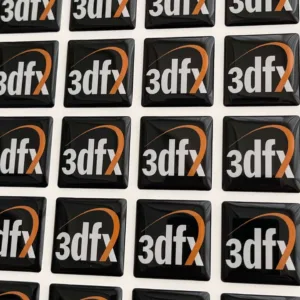
3DFX PC Case Badge Black

3DFX PC Case Badge Black, perfect for any PC case, add a touch of nostalgia from a great 3DFX era in PC history. These badges are printed on high quality white vinyl finished with a gel epoxy bubble giving that classic PC badge look and feel.


£2.08 Ex. VAT Add to basket
Indivision MK3 AGA for Amiga A1200 and A4000T
Indivision AGA MK3 Flickerfixer for Amiga CD32 and A4000D

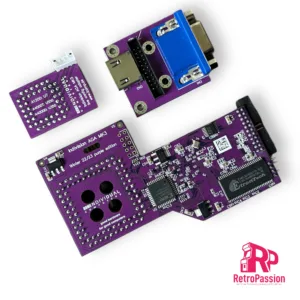
Indivision AGA MK3 flickerfixer for Amiga CD32** and A4000D (also available for the Amiga A1200 and A4000T). For installation in an A4000D, a jumper needs to be bent aside (see further down). Sporting both a VGA and HDMI socket (not used at the same time) and a fully digital output which lets you connect to a modern TV or a DVI monitor. Finally, you can connect your favourite computer to a modern flat screen and use super-hires resolutions on your workbench in full colour!

Indivision AGA MK3 does everything that it’s predecessors did and much more! With the only exception of A2024 monitor modes, all Amiga screen modes are supported and can be sent to a digital or analogue monitor at almost any frame rate, either using standard VESA modes, or using custom output frequencies and size at the user’s choice. Even custom screen modes like HighGFX can be used: Workbench resolutions of 1280×1024 pixels are possible without buying a graphics card.

Further, Indivision AGA MK3 supports synchronisation of the output signal with the computer’s V-Sync signal, which was not possible with the predecessor models. This allows silky-smooth animations and perfect scrolling without tearing. These fully synchronised modes may not be compatible with all VGA- or DVI monitors (mainly because they are 50Hz for PAL machines), but 50Hz is standard for all TVs with high-definition digital input.

Indivision AGA Mk3 is plugged over the Lisa chip. For the first time, a second (optional!) connection is required to take advantage of all features of the product: An additional adapter is clipped on top of a CIA chip to route keyboard signals to the flicker fixer. This gives way for a huge practical improvement over previous versions of the flicker fixer: You can now make small adjustments to the output picture format, including positioning and resizing of the output picture without the need to load the configuration tool. You can now open a simple menu using a hot-key combination, make adjustments with the keyboard or mouse and then exit this live configuration menu – all this without leaving the game or demo that’s currently running.

Output screen modes can be saved “per input screen mode”, so you can adjust your favourite Workbench resolution perfectly, while not affecting the settings you’ve chosen for PAL and NTSC games. Settings are saved in the flash of the flicker fixer, so they survive a reboot and/or power-cycle of the computer. As opposed to Indivision AGA MK2, more than one output mode can be saved, and instead of making manual adjustments using the live configuration menu described before, you can just “zap” through pre-sets that are ideal for a specific game or demo. This allows you to see the difference of intensity settings for the built-in scanline effect, or you can compare the scaling capabilities of your monitor with the new built-in scaler of Indivision AGA MK3.

Another improvement over the predecessor is automatic monitor recognition: The configuration tool can detect what size of monitor is connected and make suggestions for ideal output frequencies that are within the specifications of the monitor. This reduces the “first setup” to a matter of minutes.

Whats included:

  1. Flickerfixer for A4000D(*)/CD32(**)
  2. Adapter board for high-definition digital and VGA output
  3. Adapter board for CIA chip
  4. Connection cables between all boards
  5. Stainless steel back plate for HDMI/VGA output
  6. Short instructions
  7. A transfer method for the configuration tool (free download from individual Computers wiki)
  8. (Optional) HighGFX software package from Aminet (free download for higher Workbench resolutions)


(*)This flickerfixer will only fit into an A4000D after jumper J214 has been bent aside. This jumper was meant for a future chipset that was never released.

(**)For installation in a CD32, live config is only available if three solder-connections have been made, as this model does not have CIA chips. For accurate audio filter reproduction on HDMI TVs, a fourth solder connection must be made. Further, it was reported that select main boards of the CD have the crystal oscillator very close to the Lisa chip, requiring the user to move the part to the side by a fraction of a millimeter. A soldering iron may be required to accomplish this.


£183.33 Ex. VAT Add to basket
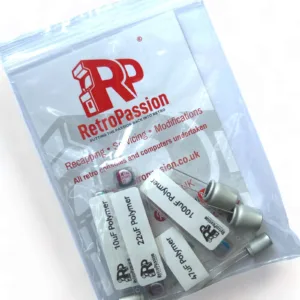
Amiga Capacitor Kit A1200 A600 CD32
Amiga A4000 Capacitor Kit Polymer (Premium)

Amiga A4000 Capacitor Kit Polymer (Premium). Polymer capacitors compared to the ‘standard’ liquid electrolyte capacitors, organic polymer is a solid electrolyte, so these capacitors will never leak. These types are still within the Commodore specification compared to other type of capacitors that are used like tantalum or polymer tantalums which should be avoided.

We only use quality capacitors and use these in our own Amiga A4000 premium recapping service.

  • Complete set of capacitors for Amiga 4000 mainboard
  • Compatible with both PAL and NTSC models
  • Compatible with all motherboard revisions

Package includes:

  • Full set of SMD and through hole capacitors.


It is assumed the right tools and techniques are used in replacing capacitors as we cannot accept any responsibility for any damage to your board using our Amiga A4000 Capacitor Kit. If your an sure we offer a range of Amiga recapping services including fixs and ultrasonic cleaning, contact us for any further information or search Amiga recapping services


Image for illustration only


£20.83 Ex. VAT Add to basket
MS-DOS PC Case Badge Black
MS-DOS PC Case Badge White

MS-DOS PC Case Badge White, perfect for any PC case, add a touch of nostalgia from a great MS-DOS era in PC history. These badges are printed on high quality white vinyl finished with a gel epoxy bubble giving that classic PC badge look and feel.


£2.08 Ex. VAT Add to basket
RAEMIXX500 Amiga A500 Replica Motherboard
Amiga 500 Plus Mainboard Remake RAEMIXX500 PART BUILT

Amiga 500 Plus mainboard remake AKA Raemixx500 is a motherboard clone of the classic A500 Plus REV 8.1A made by SukkoPera and not to be confused with the A500 ++ (A500 Plus Plus). The Raemixx500 is a good alternative to replace your existing broken A500 Plus board using your custom chips or one that is plug and play and soaked tested with all the custom chips included.

The Raemixx500 board has had a few improvements added compared to the original A500 Plus board:

  • Kickstart Switches – You can burn your Eproms and have 2 different kickstarts and use the jumpers or add switches to switch between kickstarts
  • DF0 Switch – Again becoming a must for Amiga owners to have both a internal Gotek and external drive or vice-versa, best of both worlds!This is a fully built A500 Plus Raemixx500 board with all the custom chips and is plug and play, simply add your own kickstart rom or add one of the options below.


What’s included?

  • Raemixx500 fully populated motherboard, NO Custom chips or ROM.
  • PCB colour is WHITE


What’s not included?

      • Both bottom and top shield
      • Kickstart Rom
      • Screws/Hex Screws
      • Custom Chips


£358.33 Ex. VAT Select options
TF536 A500, A500+ Amiga Accelerator
TF536 Accelerator for Amiga A500/A2000

TF536 accelerator a perfect upgrade for any Amiga A500, 500+ or A2000. Included is a gold top Motorola 68030 CPU clocked at 50mhz, 64MB of RAM, and a 2.5″ IDE connector for an CF HDD Card.

Full specs:

  • MC68030RC50C Processor
  • 64MByte of fast-ram.
  • 44 Pin IDE connector
  • Includes A500/A500+ CPU relocator
Prerequisites 
  • Kickstart ROM 3.1, 3.1.4, 3.2 to boot from IDE (available as an option below).
What is TerribleFire?

Well it’s not what it’s who, and that person is Stephen Leary who has designed a whole host of accelerators and ram cards for the Amiga A500, A1200 and Amiga CD32. These include many but the most common ones are:

£195.83 Ex. VAT Read more
Amiga A600 Keyboard Membrane
Amiga A600 Keyboard Membrane (New) BLUE

Amiga A600 Keyboard Membrane brand new BLUE. If you have issues with your Amiga A600 keyboard with missing keys or missing rows of keys the chances are the membrane needs replacing. There are 3 types of Mitsumi keyboard membrane for the Amiga A600:

This membrane is compatible ONLY with the BLUE A600 membranes, if your current A600 membrane is GREEN these are different and are available to purchase here

What if you have missing keys or rows of keys on the Keyboard? Try these possible fixes first:

  • Check the ribbon is inserted all the way in the connector on the Amiga A600 mainboard.
  • If it’s only 1 or two keys the plunger may need a clean, strip down the keyboard and clean the plunger with some IPA.
  • If it’s a whole row of keys missing its a very strong possibility that the membrane on your needs replacing.
  • The final step is to trim off 1mm of the connector (the ribbon end that plugs into the A600 mainboard).

Do let us know if any of the above fixes help you!


£24.99 Ex. VAT Read more